A Quick Reset: Why Your Nonprofit Website Matters More Than Most Boards Realize
Three plain-language facts before the examples:
- For most first-time donors, your website is the first time they meet your organization — not a gala, not a friend's text message, but a search after they read a news story. If that page doesn't answer "who are you, what do you do, where does my money actually go," many close the tab.
- More than half of nonprofit website traffic now comes from a phone. Donors look up causes standing in line for coffee or in bed at night. A site that's hard to read on mobile loses gifts before anyone has clicked "Donate."
- Your website is the de facto trust signal for your organization. A potential donor will form an impression of your professionalism, your transparency, and your competence before they meet anyone. A clear, honest site signals a clear, honest organization; a cluttered or vague one signals the opposite — fairly or not.
Every example below is selected because it solves at least one of those three jobs in a way that's worth studying — across very different organizational models.
4 Pattern Categories — Pick the One That Matches Your Nonprofit
The 12 nonprofit website examples in this guide cluster cleanly into four design patterns. Each pattern solves a different fundamental problem — knowledge access, investigative content, crisis response, or specific-population advocacy — and your choice should be driven by what your organization actually does, not by which pattern looks most fashionable.
Pattern | Best for | Example organizations | |
1 | Knowledge commons (the site IS the gift) | Open knowledge, education, archive nonprofits | Wikipedia, Internet Archive, Khan Academy |
2 | Nonprofit newsroom (investigation is the mission) | Public-interest journalism, accountability orgs | ProPublica, The Marshall Project, Bellingcat |
3 | Humanitarian crisis response | Disaster relief, medical aid, urgent advocacy | MSF, British Red Cross, Crisis |
4 | Cause-specific advocacy & vulnerable populations | LGBTQ, mental health, education funding, food security | The Trevor Project, DonorsChoose, Trussell Trust |
The 12 nonprofit website examples below are organized into these four groups. Pick the row that's closest to your work, then steal the moves that fit.
Pattern 1: Knowledge Commons — When the Website IS What You're Donating To
This category gets almost zero attention in standard best nonprofit websites lists and is one of the most overlooked sets of nonprofit website examples in the sector. When the product is the website — when donors aren't funding a separate program but the actual digital infrastructure they're using — the homepage has a different job than a typical charity. It has to make the case for the thing the visitor is already getting for free.
1. Wikipedia / Wikimedia Foundation — The World's Most Successful Banner Ask
Pattern: Encyclopedia front end + periodic in-context donation banners + a separate foundation site for transparency
Wikipedia is the fifth-most-visited website in the world and one of the most successful nonprofit website examples of all time — but most visitors never see the Wikimedia Foundation site at all. They see Wikipedia, the encyclopedia. The fundraising model is built on a banner that appears across the top of articles during seasonal campaigns, asking for small donations from regular readers. The banner copy reads like a letter from the founder, not a marketing pitch. The Wikimedia Foundation's own site, separately, is where institutional donors, journalists, and governance-curious visitors find financial reports, policy positions, and the legal entity behind the encyclopedia.
Three things to steal:
- Separate your product site from your fundraising / governance site if they serve different audiences. Most nonprofits stuff "Donate," "About," "Annual Report," and "Program" on one page. Wikipedia keeps the product front and center and routes serious donors / journalists / regulators to a second site. For nonprofits where the program is the digital product, this two-site split clarifies both audiences.
- In-context donation banners outperform separate donation pages. Wikipedia's banner appears where the reader is already using the product. The relevance is the conversion. For nonprofits with high traffic to specific content (a blog, a database, a tool), embedded asks beat directing people to a separate
/donatepage. - Write your donation ask like a letter, not a marketing campaign. Wikipedia's banner is signed (often by Jimmy Wales or another foundation leader), written in plain first person, and acknowledges that most readers won't give. That honesty converts better than urgency or guilt.
2. Internet Archive — Library, Mission, Donation Page in One
Pattern: Public digital library homepage that doubles as a nonprofit pitch
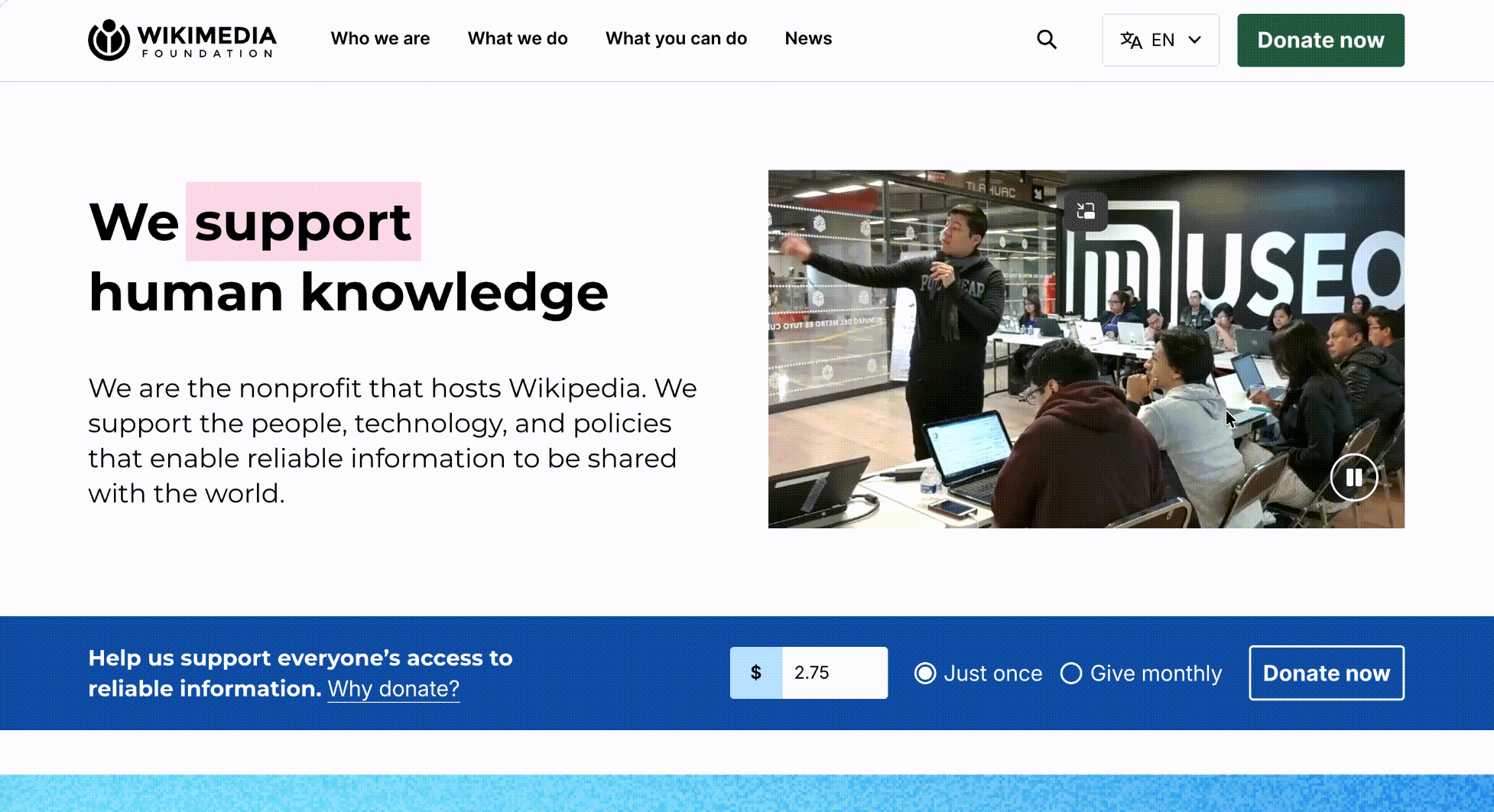
The Internet Archive houses the Wayback Machine, millions of digitized books, vintage software, audio, and video — all freely accessible. Among large-scale NGO website examples, it's one of the most unusual: the homepage is essentially a library catalog, but the persistent navigation includes a "Donate" link that lives in the same visual weight as "Search" and "About." This is unusual: most nonprofits put donation behind a separate page or a hero CTA. The Archive treats donation as a permanent nav item, the way a public library would treat membership. The result is that a visitor researching a 1972 newspaper might give five dollars on the way out without feeling marketed to.
Three things to steal:
- A "Donate" link in the main navigation, every page, every device. Many nonprofit sites bury donation under "Get Involved" or "Support Us." The Internet Archive makes it as discoverable as Search. Donors give when they're in the right mindset — surface the path always.
- For organizations with a digital archive or library, expose the catalog on the homepage. Don't make donors guess what their money preserves. Internet Archive's homepage shows actual books, software, and archives being preserved. The product is the case for support.
- Public-good positioning beats charity positioning for educated donors. Internet Archive's copy frames the organization as "the digital equivalent of a public library," not as a charity case. For nonprofits whose donors are professional, well-read, or institutional, leaning into a public-good frame outperforms hardship-driven appeals.
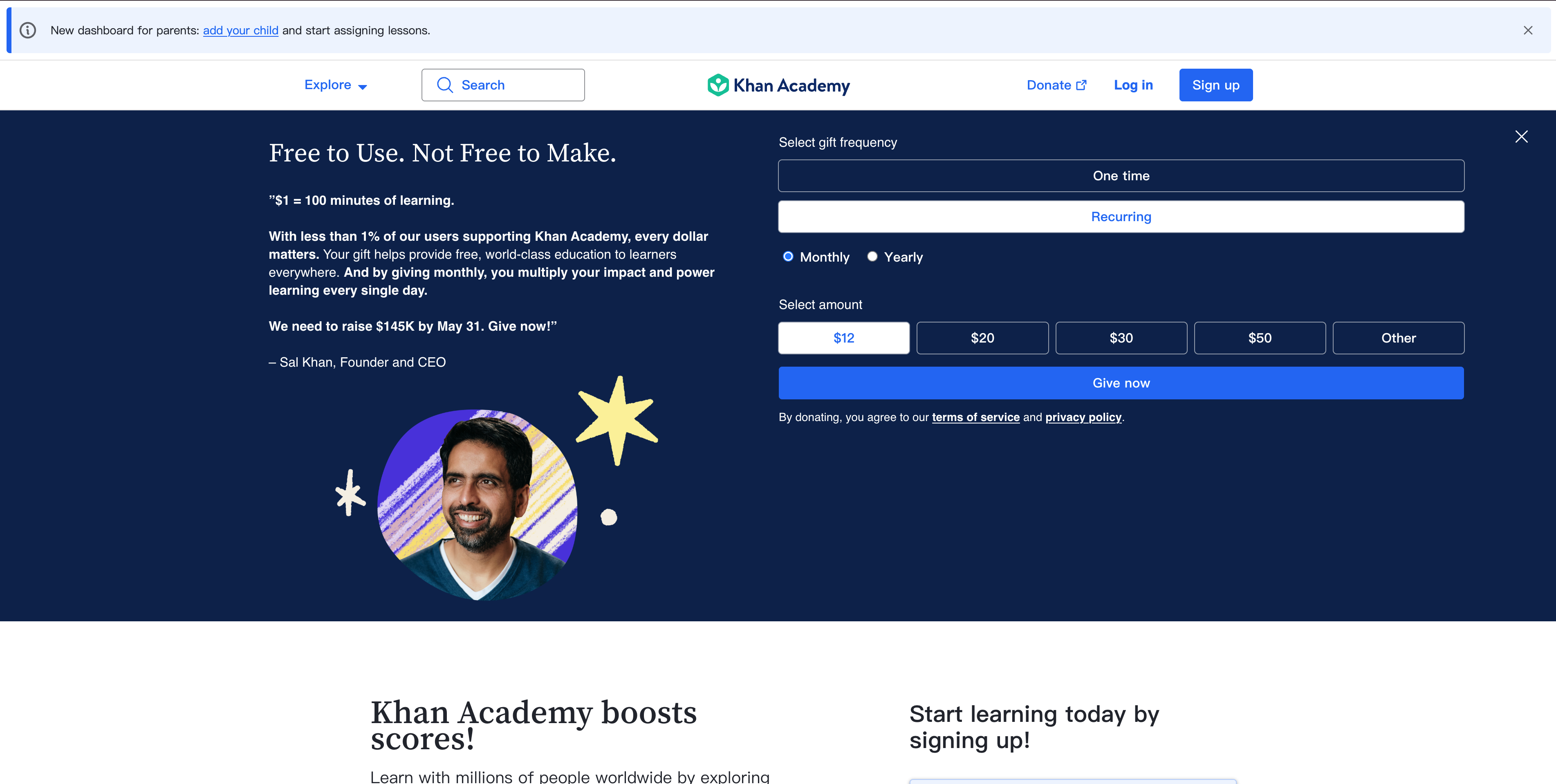
3. Khan Academy — When Your Product Reaches 150 Million Learners
Pattern: Free learning platform with a separate, clearly-marked donation flow that funds the platform itself
Khan Academy reaches around 150 million learners worldwide and operates as a 501(c)(3) nonprofit funded primarily through philanthropic donations. Among education-platform nonprofit website examples, it's the most-studied case: the website's primary job is delivering math lessons, science videos, and SAT prep to students — not converting visitors to donors. But the "Donate" pathway is honest and well-designed: a dedicated page that explains the cost-per-learner economics, an option to give monthly, and named giving levels that reflect the organization's actual budget structure. Importantly, the learning experience is never paywalled or gated by a donation prompt — which is itself a fundraising statement.
Three things to steal:
- Never gate your service to push donations. Khan Academy could place "support us" pop-ups in every video. They don't. The trust that builds with learners and their parents — many of whom become donors years later — is more valuable than short-term conversion.
- Show cost-per-impact economics on your donation page. Khan Academy's giving page explains roughly what each donation level funds in terms of learner reach. This is more credible than aspirational pitches and gives donors a frame for choosing an amount.
- Monthly giving deserves its own visual track. Khan Academy surfaces monthly recurring giving with equal or higher visual weight than one-time donations. Recurring donors are the single most valuable acquisition for nonprofits — the website should reflect that.
Pattern 2: Nonprofit Newsrooms — When Investigation IS the Program
This is another category that standard nonprofit website examples roundups almost completely ignore: public-interest journalism nonprofits whose entire program is the reporting they produce. These sites look more like newsrooms than charities, and the design lessons from these nonprofit website examples translate to any nonprofit whose primary deliverable is research, reports, or content.
4. ProPublica — A 501(c)(3) That Looks Like a Newsroom Because It Is One
Pattern: Investigative newsroom homepage with mission framing in the footer and donations as a permanent secondary CTA
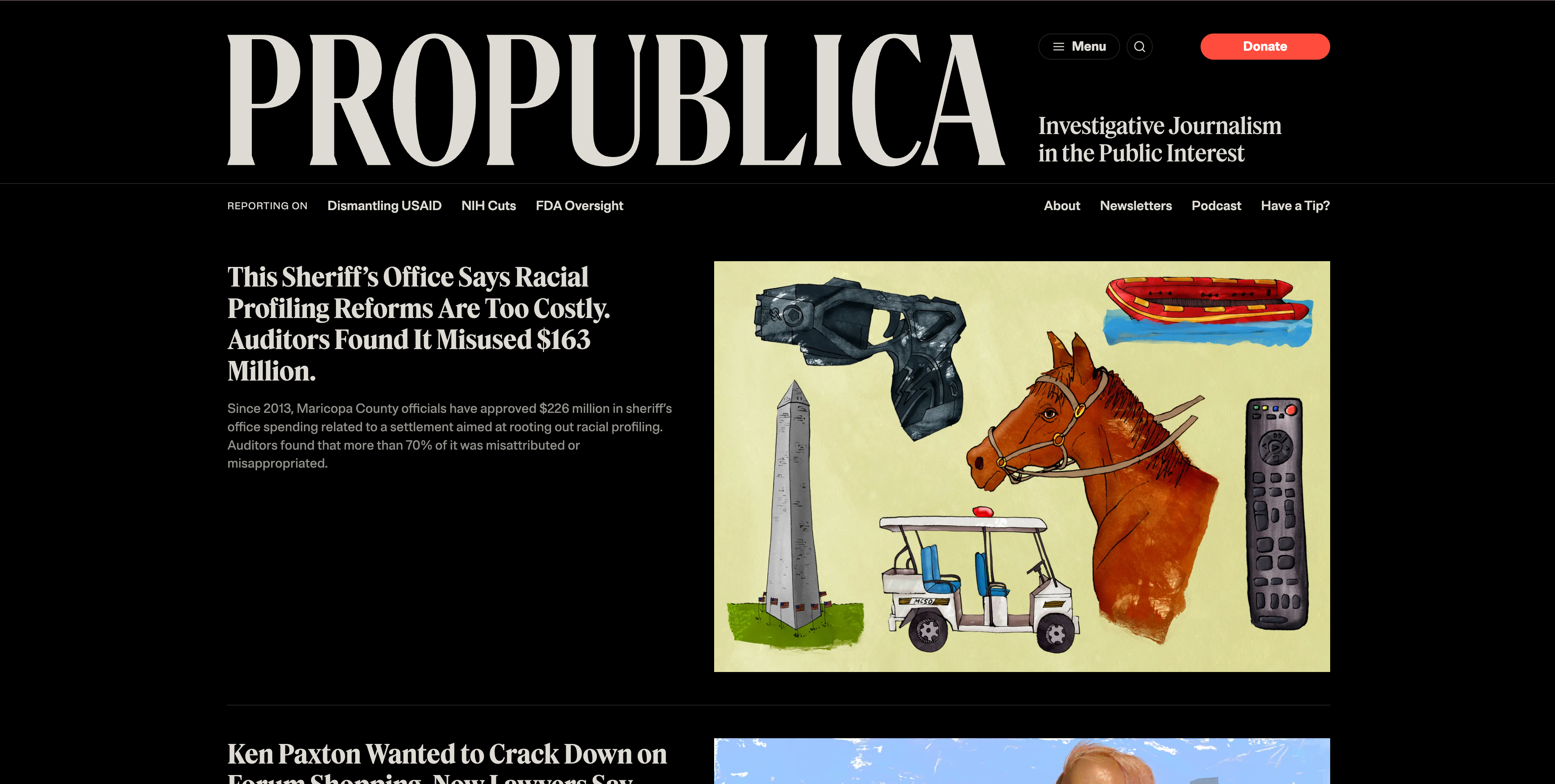
ProPublica is a Pulitzer-winning investigative journalism nonprofit and one of the most distinctive nonprofit website examples in the public-interest journalism category. The homepage is structured like The New York Times, not like a charity — lead story above the fold, secondary stories in cards below, sections organized by beat (Health, Politics, Justice, Climate). The "Donate" button sits in the header but doesn't dominate. The "About" and mission framing is deliberately quiet; what makes the case for support is the work itself. This is the inverse of most nonprofit homepages — which lead with their mission statement and bury the actual work.
Three things to steal:
- If your program produces content, design like a publication. Most nonprofit sites are brochures with a "Latest News" sidebar. ProPublica is a publication with a quiet donation ask. The conversion comes from the reader being impressed by the work, not from being asked.
- Reader experience first, donation pitch second. ProPublica's most-read articles get full-page treatment, generous typography, and embedded data visualizations. The donation prompt appears at the end of articles, after the reader has experienced the value. This sequencing dramatically outperforms upfront asks.
- Republish-and-credit is a distribution strategy. ProPublica explicitly licenses its reporting under Creative Commons for any newsroom to republish. Each republication carries a "ProPublica is a nonprofit newsroom..." footer, which is the most effective awareness-building any small nonprofit could ask for. If your content is your program, give it away with attribution.
5. The Marshall Project — Single-Issue Focus, Beautifully Executed
Pattern: Criminal-justice newsroom with a strong editorial identity and explicit nonprofit framing
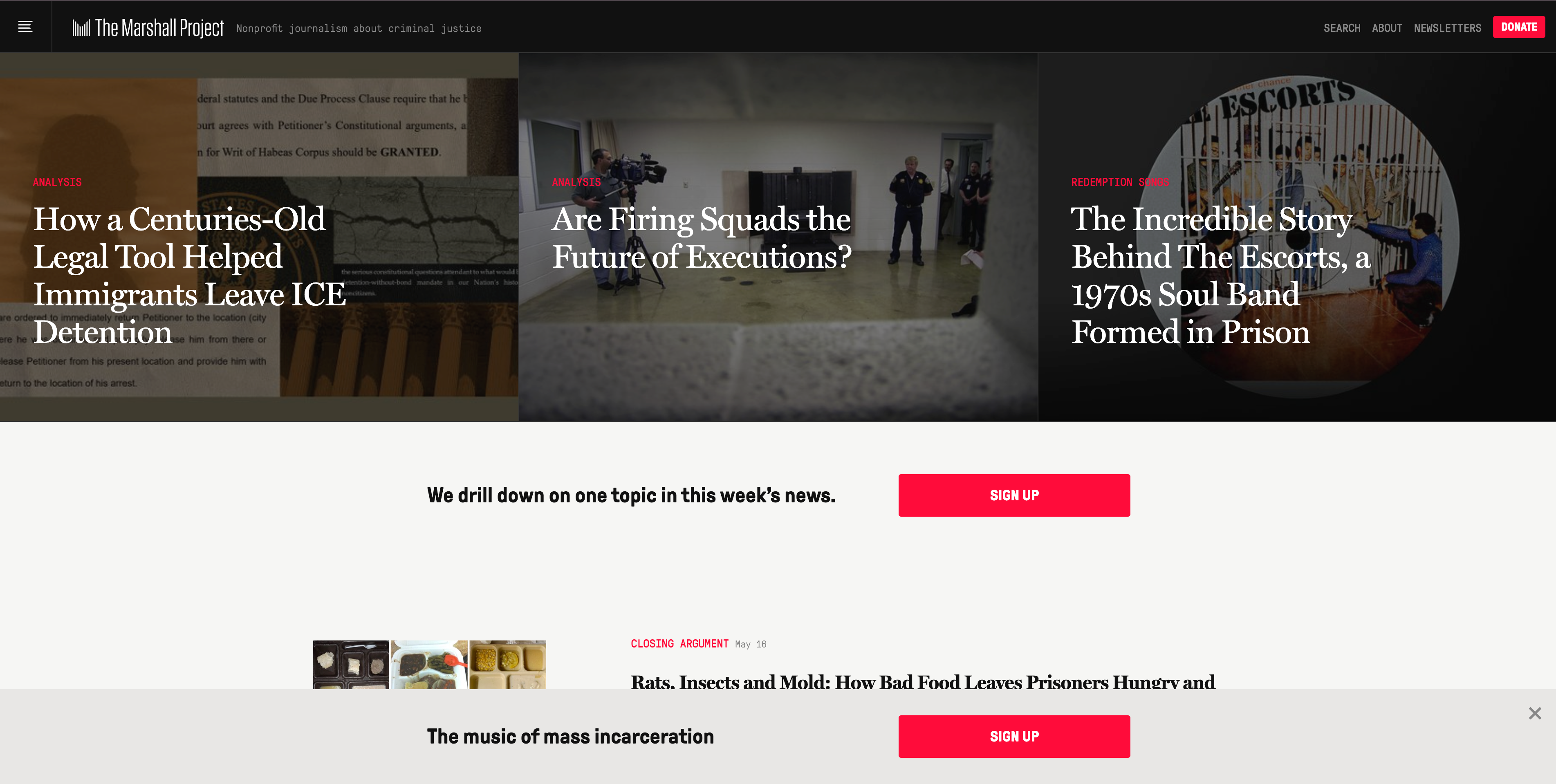
The Marshall Project covers one beat — the US criminal justice system — and the design reflects that focus. Among single-issue nonprofit website examples, it's a masterclass in editorial discipline: strong serif typography, restrained color palette, and an editorial layout that lets long-form investigations breathe. The footer carries the nonprofit framing: a clear "We are a nonprofit news organization. Support our work" with a giving CTA. Their "Closing Argument" newsletter, which arrives weekly with a single original essay, is essentially the organization's reach engine — and it's surfaced prominently on the homepage.
Three things to steal:
- A single-issue nonprofit can build a stronger editorial identity than a generalist one. Marshall Project's focus on criminal justice gives them visual and tonal consistency that broader nonprofits struggle to match. If you have a tight cause focus, lean into it visually.
- A signature newsletter is the most underrated nonprofit asset. Marshall Project's "Closing Argument" is what brings readers back weekly — and what converts them to donors over time. For any content-producing nonprofit, treat the newsletter as a flagship product, not a sidebar.
- Member journalism beats subscription journalism for nonprofits. Marshall Project asks readers to "become a member" rather than "subscribe." The framing positions giving as participation in a mission, not payment for a service. The same conversion math applies to most nonprofits — frame giving as belonging.
6. Bellingcat — Open-Source Investigation as a Nonprofit Model
Pattern: Investigative collective with a how-we-do-it methodology section as central as the investigations themselves
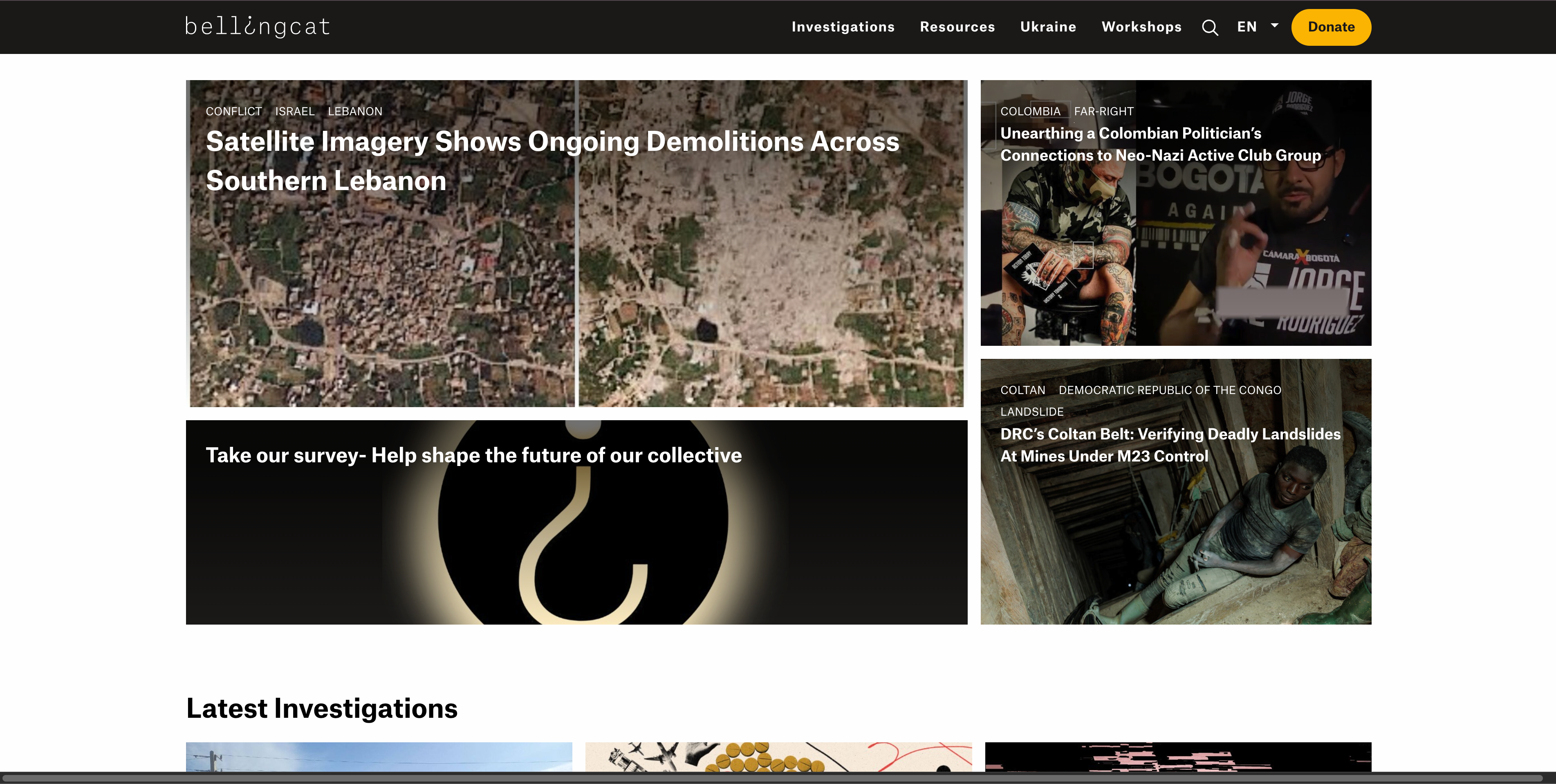
Bellingcat is a Netherlands-based investigative journalism nonprofit specializing in open-source intelligence — verifying conflicts, war crimes, and disinformation using publicly available data, satellite imagery, and social media. Among international nonprofit website examples, it has a unique addition: a dedicated "Resources" section that teaches the methodology of open-source investigation. The investigations themselves are the program, but the methodology section trains the next generation of researchers. The "About" page explicitly explains the nonprofit funding structure and refuses certain government funding to protect editorial independence.
Three things to steal:
- Show your methodology, not just your results. Bellingcat publishes the techniques they use to verify videos, geolocate images, and analyze flight data. For research and investigation nonprofits, methodology transparency is the deepest form of credibility-building.
- Be explicit about funding sources and refusals. Bellingcat publishes a list of who funds them and which sources they refuse (e.g., they don't take money from intelligence services). This level of transparency is more powerful than any "Our Values" copy.
- Workshops, fellowships, and training programs deserve homepage placement. Bellingcat trains journalists and researchers worldwide. Training is both a program (mission) and a revenue line (fees). For nonprofits doing both, expose the offering prominently.
Pattern 3: Humanitarian & Crisis Response — When the Homepage Might Change Tonight
Crisis-response nonprofit website examples have a design problem most charities don't face: the homepage may need to be rewritten in 30 minutes when a major event happens. An earthquake, an outbreak, a conflict escalation — the site has to surface emergency-response messaging, accept urgent donations, and link to safety information, all while the rest of the organization is still operating its normal programs.
7. Médecins Sans Frontières (Doctors Without Borders) — Editorial Flexibility Under Pressure
Pattern: Multi-country humanitarian medical nonprofit with a homepage built for rapid editorial updates as crises unfold
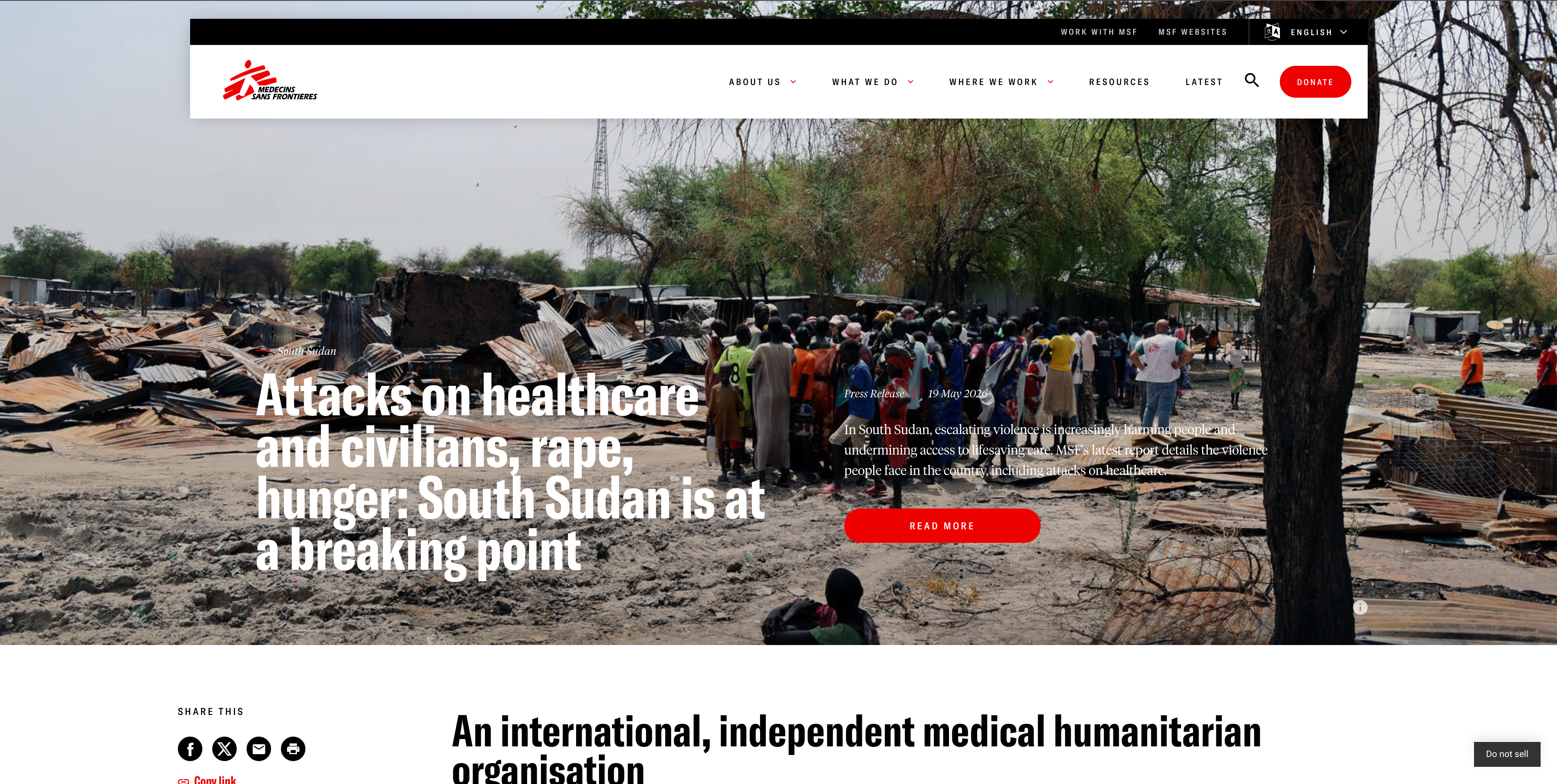
MSF operates in over 70 countries and is one of the most widely-referenced nonprofit website examples for editorial-driven design — handling a constant flow of news from those operations. The homepage is essentially an editorial layout — lead story, secondary cards, country and topic filters — that any editor can update within minutes. When the situation in Gaza, Sudan, or Haiti changes, the homepage reflects it the same day. Donation calls-to-action remain consistently visible but don't compete with the news; the principle is "tell the truth, then let people decide if they want to help." MSF's separate country-specific sites (msf.org for international, doctorswithoutborders.org for US, doctorswithoutborders.ca for Canada, etc.) maintain regional editorial control without fragmenting the brand.
Three things to steal:
- Build an editorial system, not a marketing site. If your nonprofit responds to fast-moving situations, your CMS has to let any communications staffer push an update without engineering help. Marketing-first sites are too brittle for crisis response.
- Country-specific subsites with shared identity. MSF maintains separate domains for major donor countries while keeping visual and editorial consistency. This serves regional fundraising regulations and local-language audiences without forcing one site to do everything. For multi-country NGO website examples, this hub-and-spoke structure is the dominant 2026 pattern.
- Bear witness as a content category, not a marketing tactic. MSF's "Voices from the Field" content gives field staff and patients direct quotes and stories. This is the opposite of polished marketing — and it converts donors precisely because it doesn't feel manufactured.
8. British Red Cross — When You Run Both Long-Term Programs and Emergency Response
Pattern: Large established humanitarian charity with a dual-mode homepage — steady-state programs on regular days, emergency banner on crisis days
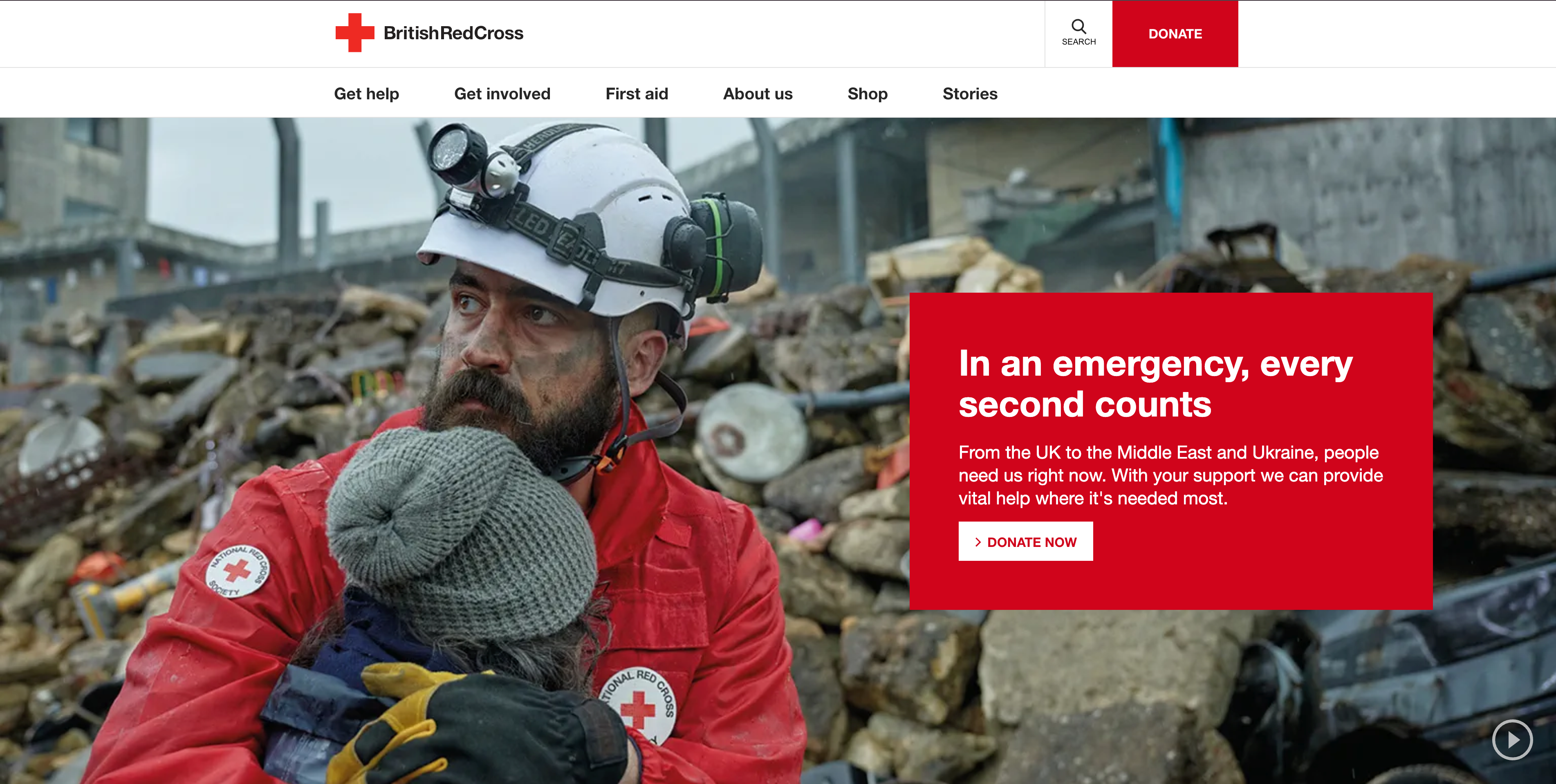
The British Red Cross runs ambulance support, refugee services, first aid training, and a charity-shop network in the UK, while also responding to international emergencies through the global Red Cross network. Among large established nonprofit website examples, it handles both steady-state and crisis-response states with notable elegance. On a normal day, the homepage features campaigns, volunteering, and first-aid resources. When an emergency hits, a banner takes over the top of every page with a dedicated emergency appeal and donation flow. The shop and first-aid content remain accessible but recede. The toggle between steady-state and crisis-mode is structural, not bolted on.
Three things to steal:
- Design your homepage with two modes from day one. Don't wait until a crisis to figure out how to surface an emergency appeal. Build a slot in your template that any communications lead can fill within minutes during a crisis.
- Multi-channel revenue deserves multi-channel surface area. British Red Cross funds its work through donations, charity shops, first-aid course fees, and government contracts. The website exposes all of these revenue paths — not just donations. For nonprofits with diversified revenue, the website should match.
- Volunteer recruitment as first-class content. Volunteer signup gets prominent navigation and a clear "what's involved" walkthrough. For most nonprofits, volunteers are both labor and future donors. Don't treat the volunteer pathway as an afterthought.
9. Crisis (UK Homelessness) — A Seasonal Campaign That Carries the Whole Year
Pattern: UK homelessness charity whose Christmas campaign drives a large share of annual revenue, with a website that pivots seasonally
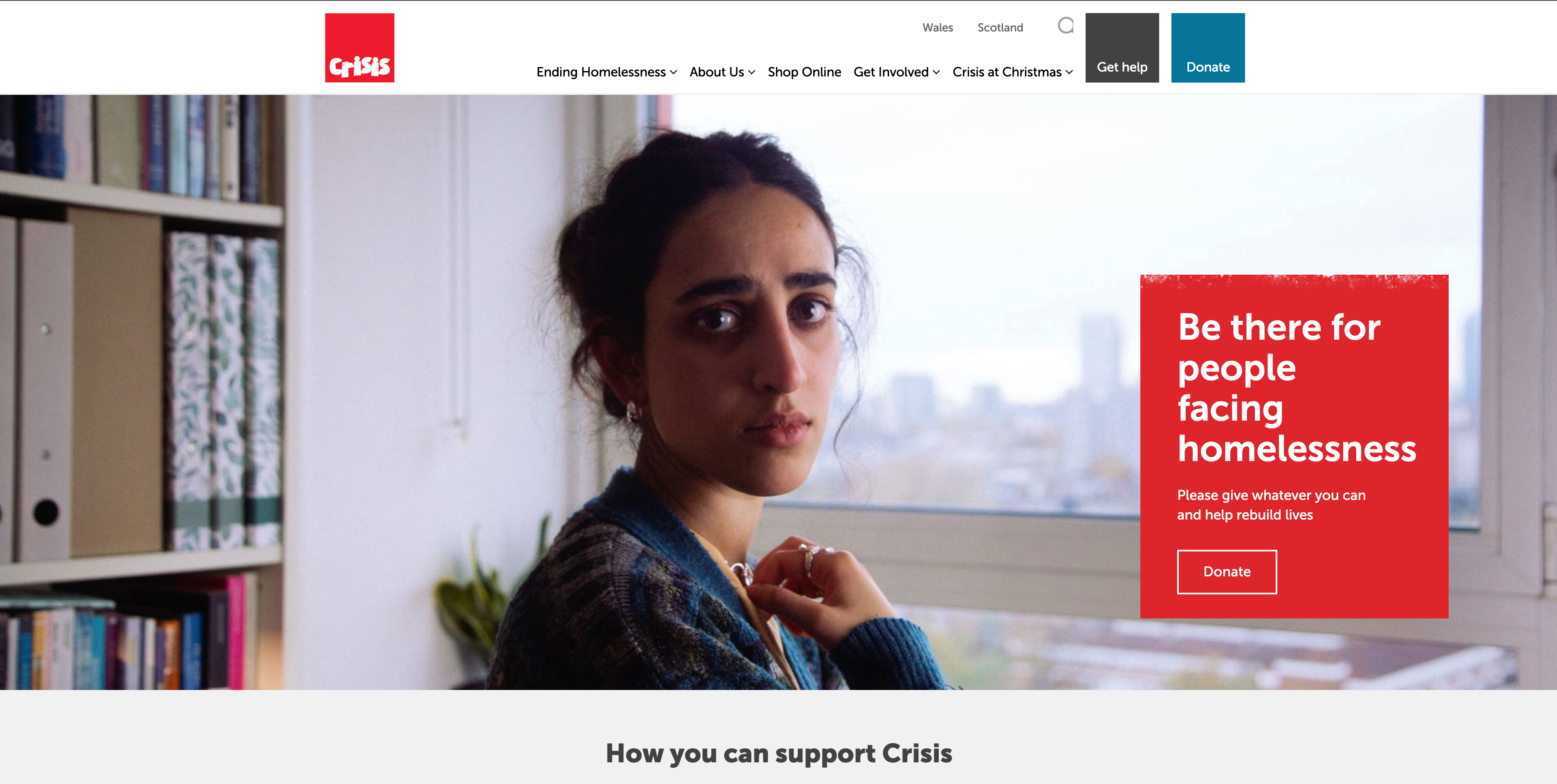
Crisis is the largest UK homelessness charity, and "Crisis at Christmas" is one of the best-known fundraising campaigns in British public life. Among seasonal-campaign nonprofit website examples, the site pivots in November–December: the homepage becomes a dedicated Christmas appeal, the "reserve a place" donation mechanic (£X.XX reserves a place for someone experiencing homelessness over Christmas) becomes the central CTA, and policy content moves to secondary positions. After the campaign, the homepage returns to year-round program and policy framing. The seasonal pivot is more disciplined than most nonprofits attempt.
Three things to steal:
- A signature seasonal mechanic outperforms generic year-end asks. "Reserve a place" works because it's concrete, specific, and emotionally clear. Generic "Help us this Christmas" appeals do worse year over year. Invent a specific mechanic and own it.
- Year-round policy content + seasonal campaign isn't a contradiction. Crisis is taken seriously by UK policymakers because of its research and policy work, and it raises enormous sums through emotional Christmas appeals. The same website does both. Pick a structural division of labor between policy and campaign pages.
- A dedicated "for journalists" or media page builds policy credibility. Crisis maintains a media center with quotable statistics, expert spokespeople, and a press contact. For policy-influencing nonprofits, this is part of the program — not a marketing afterthought.
Pattern 4: Cause-Specific Advocacy & Vulnerable Populations — When Your Audience Is in Crisis
Some nonprofits serve people in immediate distress — LGBTQ youth contemplating suicide, families relying on food banks, classrooms without supplies. The website's first job is not fundraising; it's safely connecting the person at risk with the help they need. The three nonprofit website examples below get this priority order right, and then layer the fundraising on top.
10. The Trevor Project — Safety First, Donations Second
Pattern: LGBTQ youth crisis-intervention nonprofit with crisis access surfaced more prominently than donations
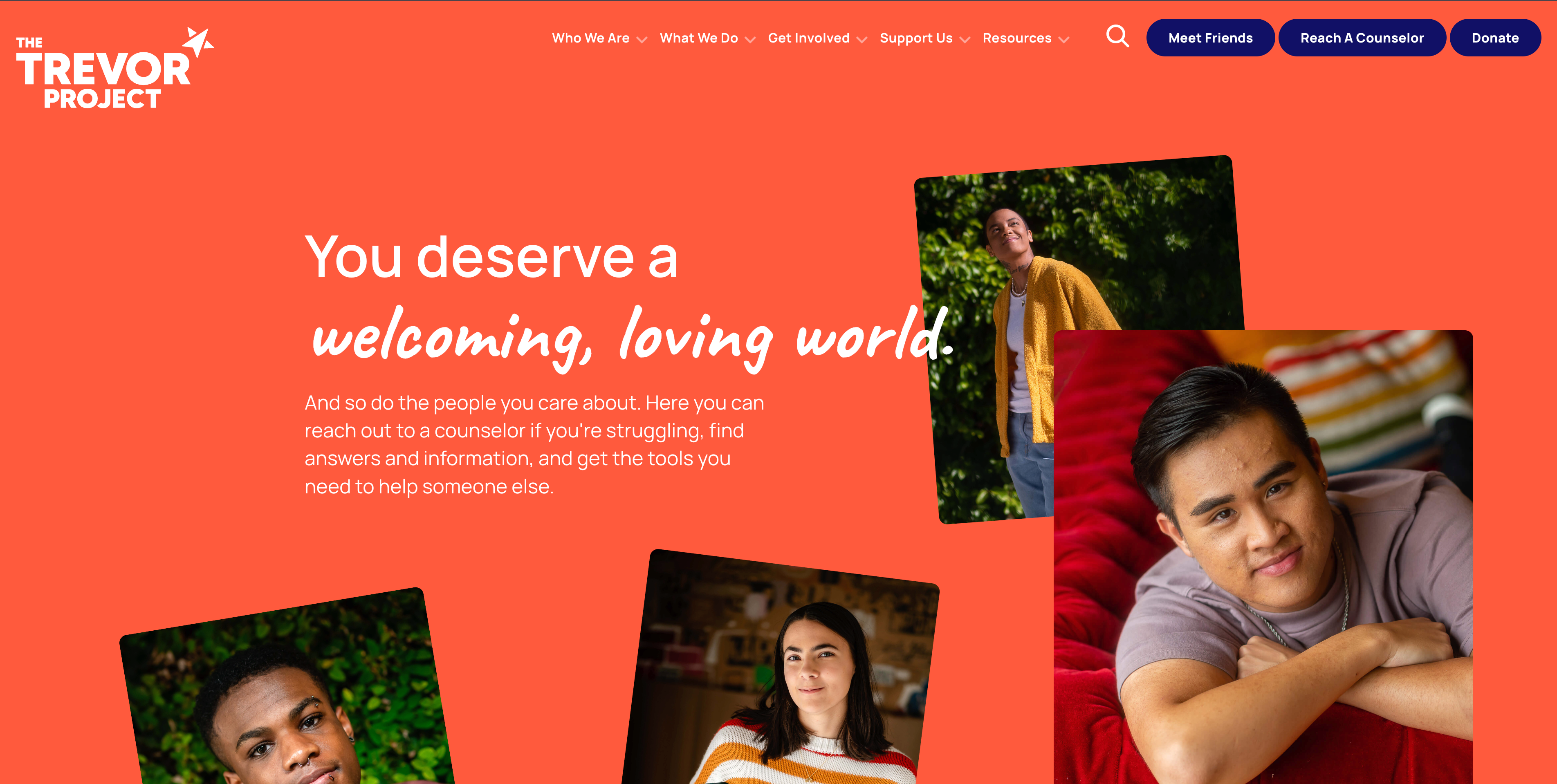
The Trevor Project provides crisis services for LGBTQ young people in the US — phone, text, and chat counseling 24/7. Among service-led nonprofit website examples, it has a strict priority order few others match. The top of every page carries a persistent "Reach a Counselor" bar with three contact methods (call, text, chat) and a quick-exit button for users in unsafe environments. Donations live in the navigation but never above safety access. The visual design is warm and welcoming, not crisis-coded — the front door has to feel safe before the help can be useful.
Three things to steal:
- For nonprofits serving people at risk, safety access goes above the fundraising ask. Every time. No exceptions. If someone visits The Trevor Project's site in crisis, donating must be the least prominent path. This priority order is moral and practical.
- A "quick exit" button for sensitive content. Domestic violence, LGBTQ, mental health, and immigration nonprofits often serve users who can't be seen on the site. A persistent button that redirects to a neutral page (Google, weather) protects users. Surveillance from abusers, parents, or employers is a real threat.
- Counselor-first navigation language. The Trevor Project uses "Reach a Counselor," not "Get Help" or "Resources." Specific language signals what's actually on the other side of the click. For any direct-service nonprofit, the nav labels should describe the actual service, not a category.
11. DonorsChoose — A Nonprofit That Operates Like a Marketplace
Pattern: Teacher classroom-funding marketplace where donors browse and fund specific projects, like a giving version of Etsy
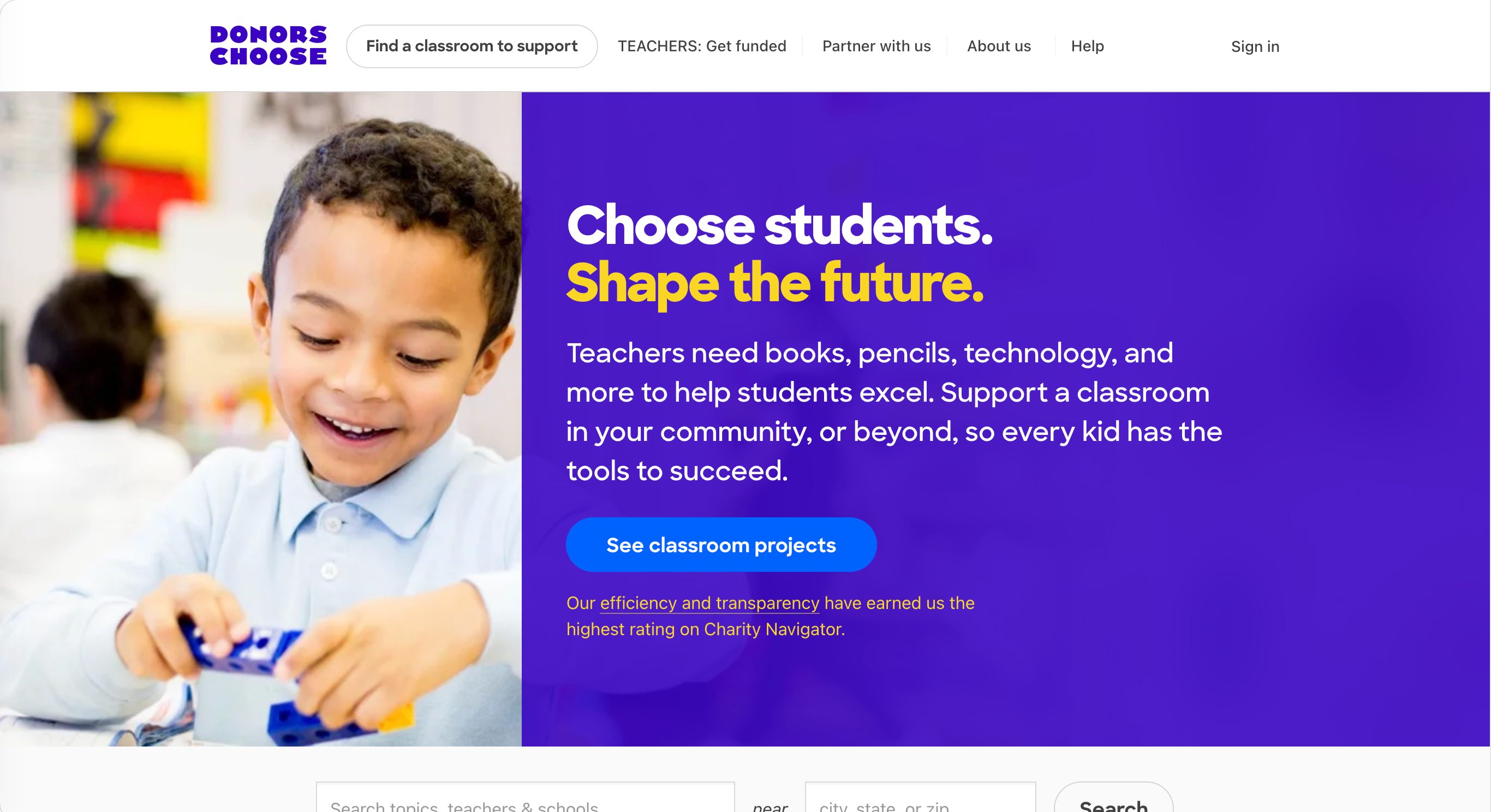
DonorsChoose lets US public school teachers post specific classroom-funding requests ("16 colored pencil sets for my 3rd graders," "a microscope for our science lab"), and donors fund them directly. Among marketplace-model nonprofit website examples, it's the standout: the website is structured as a marketplace, not a charity homepage — search filters by subject, grade level, location, and dollar amount; project pages with the teacher's photo, written ask, and progress bar; checkout that handles tax-deductible giving and matches across the project. This model converts because the donor isn't giving to "education" abstractly; they're funding a specific 3rd grade classroom in a specific zip code.
Three things to steal:
- If your impact can be unbundled into specific projects, expose it as a marketplace. DonorsChoose treats each classroom request as a product page. International development nonprofits (GlobalGiving), animal rescues, school-supply drives, and disaster-recovery nonprofits can all use this pattern. Specific beats general.
- A progress bar on a giving page outperforms a static thermometer. Each DonorsChoose project shows exactly how much has been raised and what's still needed. The math is concrete. Most nonprofit homepage "fundraising thermometers" are abstract; project-level progress bars are concrete.
- Beneficiary photos and written asks build trust faster than organizational copy. When a teacher writes their own request ("My students in Bronx, NY need..."), the authenticity is undeniable. For nonprofits whose beneficiaries can participate in their own asks (with proper consent and safety considerations), this beats third-person organizational copy.
12. The Trussell Trust — UK Food Bank Network with a Policy Backbone
Pattern: Network of UK food banks (1,400+ centers) with both a service-finding tool and a serious policy-research arm
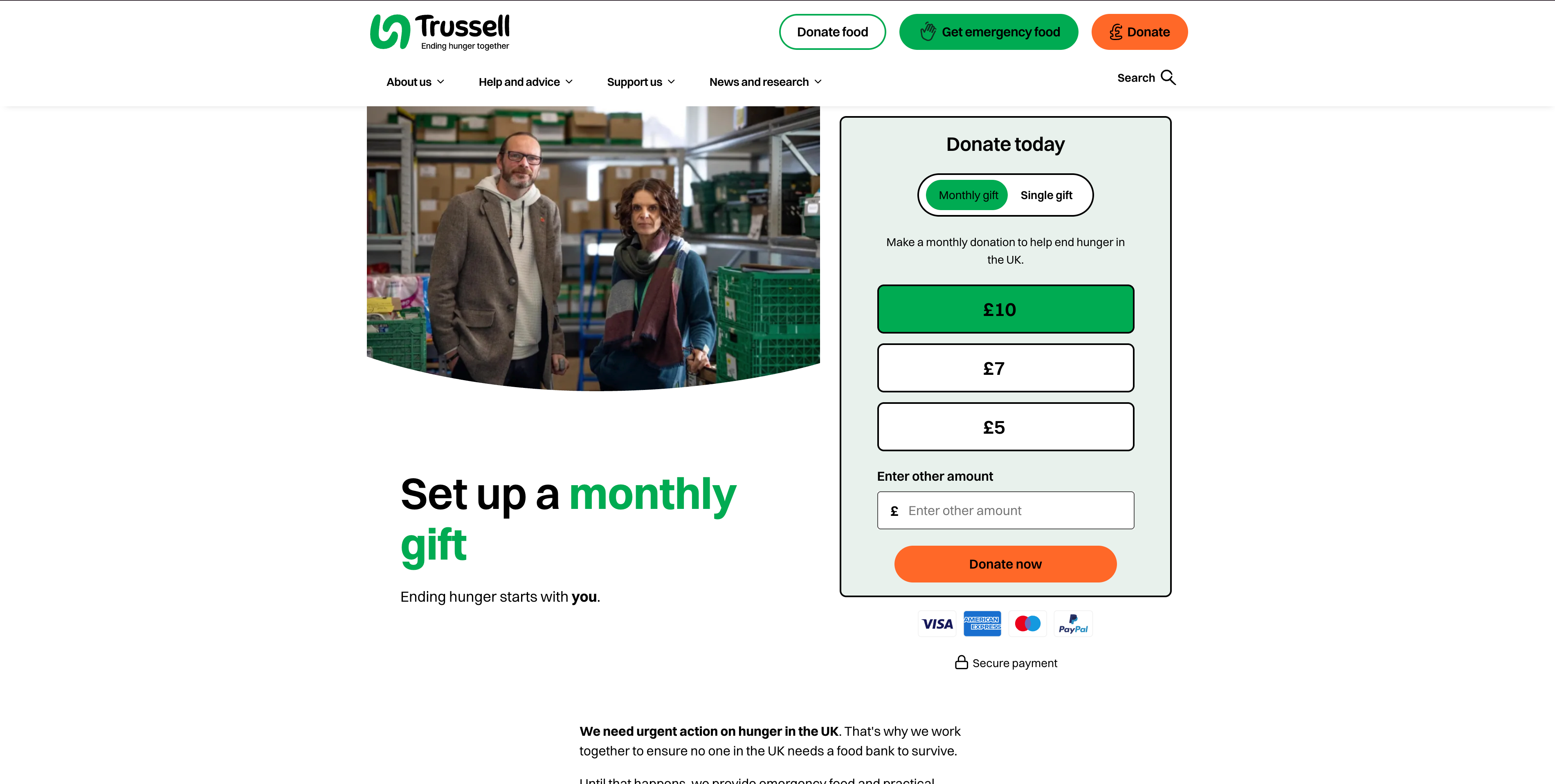
The Trussell Trust operates a network of UK food banks and is one of the most instructive nonprofit website examples for multi-audience design. The site has to do two things at once: help someone who needs food right now find the nearest food bank with up-to-date opening hours, and brief policymakers, journalists, and donors on the structural causes of UK food insecurity. The "Find a Food Bank" tool is a postcode search that returns nearby locations with hours, contact info, and what's needed. Separately, the policy section publishes original research on welfare reform, child poverty, and food insecurity statistics — used by UK media regularly. The two audiences (people in need / policymakers + donors) get equal navigation prominence.
Three things to steal:
- A postcode / ZIP code service finder is a high-value page for any geographically distributed nonprofit. Food banks, shelters, free clinics, support groups — if your services are physical and local, build a real finder, not a static list.
- Original research is one of the strongest credibility moves a nonprofit can make. Trussell Trust's reports on UK food insecurity are cited by the BBC, The Guardian, and Parliament. This positions the organization as authoritative — not just operationally good, but intellectually serious about the cause.
- Service users and policy audiences can share a website without conflict. The Trussell Trust doesn't force someone seeking food to wade through policy content, and doesn't force policymakers to wade through service-finder content. Two clear lanes from the homepage. For multi-audience nonprofits, this dual-lane structure outperforms a generic "Who We Are" sprawl.
The 5 Mistakes That Quietly Kill Nonprofit Website Performance
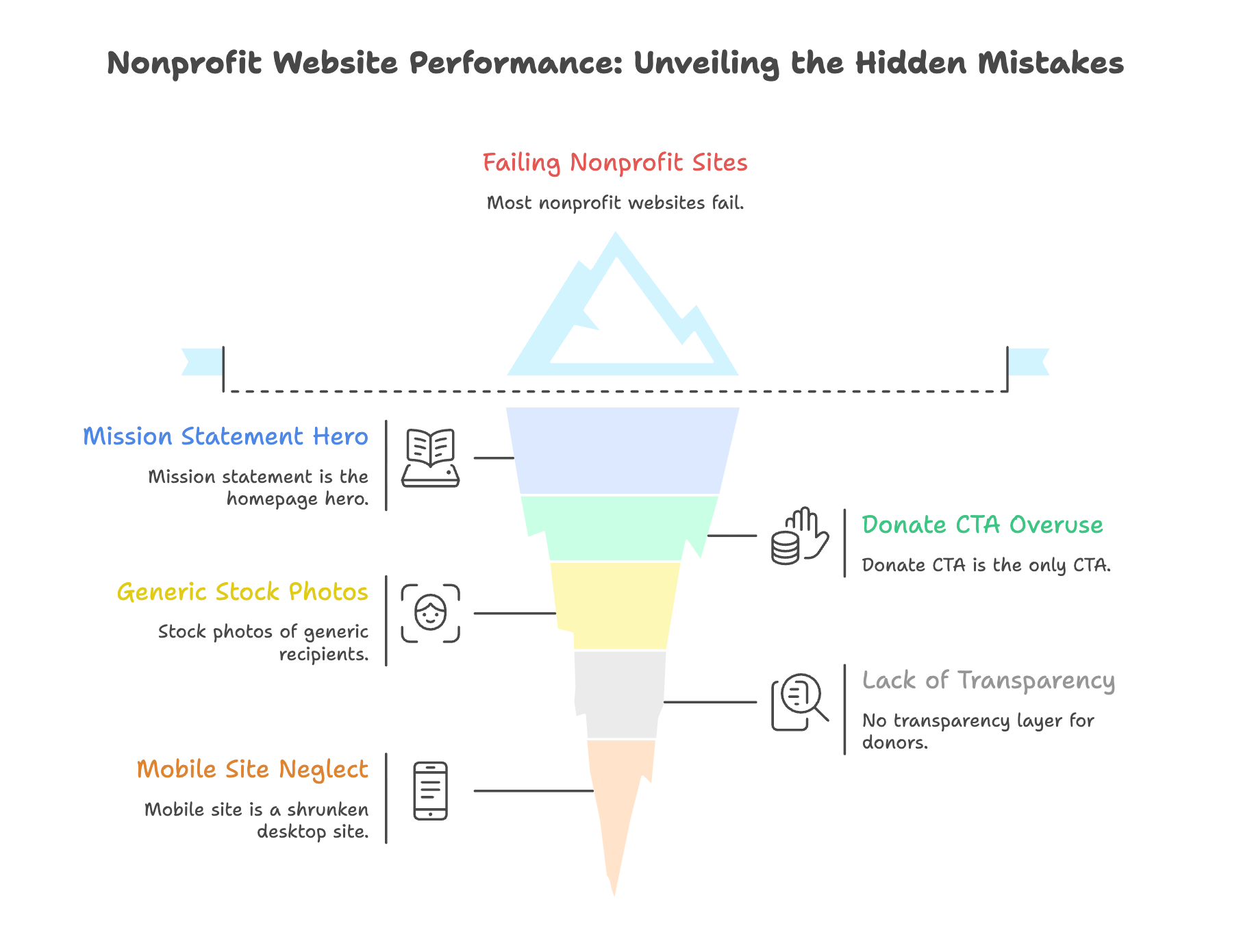
Across hundreds of nonprofit web design audits, these five errors account for most failing nonprofit sites — and they show up in roughly nine out of ten of the nonprofit website examples I review for first-time clients:
- The mission statement is the homepage hero. A 50-word "We are a nonprofit committed to advancing..." block above the fold is the most common nonprofit homepage mistake. Visitors don't read it. Lead with what you do and what's at stake — show your work, then explain it.
- Donate is the only CTA, and it's the loudest thing on the page. Most first-time visitors aren't ready to donate. They want to understand, read, watch, learn — and possibly give later. A "Donate Now" button shouting at every visitor over-asks the cold audience and under-serves the warm one. Layer your CTAs by readiness.
- Stock photos of generic recipients. Photos of unidentified smiling children, hands holding food, or sunset crosses signal that the nonprofit doesn't have its own story to tell. Real photos of real people (with consent and dignity) convert better and build trust.
- No transparency layer. A serious donor will look for an annual report, 990 (US), audited accounts (UK), board list, and overhead ratios. Hiding these signals something to hide. Make financial transparency two clicks from the homepage.
- The mobile site is a shrunken desktop site. Over half of nonprofit website traffic is mobile, and a non-trivial share of that is older donors on phones at 9pm reading a thank-you email from a recent gift. A mobile nonprofit website has to be the primary version, not the responsive afterthought.
Modern Nonprofit Website Best Practices in 2026
Beyond avoiding those mistakes, six things consistently separate the best nonprofit website examples 2026 from the rest — and the same patterns show up across all 12 of the nonprofit website examples in this guide:
- A persistent "Donate" link in the main nav, not just a hero button. Donors decide to give at unpredictable moments. Always make the path obvious.
- A dedicated donation page with multiple amounts, monthly option, and a clear cost-per-impact frame. Generic giving forms underperform forms that explain what each dollar funds.
- Annual report, financials, and 990 (or equivalent) in the footer. Don't hide your transparency layer behind "About Us" — surface it everywhere.
- Real photography of actual people, with consent and dignity. Stock photography is a tell. Real photos build trust.
- A safe-exit affordance for sensitive-audience nonprofits. If your visitors might be in unsafe environments, build for that.
- Multi-channel signup, not just email. Email is still central, but SMS, WhatsApp, and platform-specific (Facebook, Instagram) audiences need their own paths into your supporter list.
- Clear, descriptive nonprofit website navigation. Don't use vague labels like "Solutions" or "Resources." Use labels that describe what's actually on the other side of the click — "Find a Food Bank," "Reach a Counselor," "Annual Reports," "Volunteer with Us."
- Borrow nonprofit website ideas from outside the sector when they fit. The marketplace pattern from DonorsChoose comes from e-commerce; the editorial pattern from ProPublica comes from journalism; the in-context banner from Wikipedia comes from publishing. The best nonprofit website ideas often arrive when teams stop looking only at other nonprofit sites for inspiration.
How Wegic Generates Nonprofit Websites by Default
Most nonprofit website builder platforms make you start with a template that looks like every other charity — and the result rarely matches any of the strong nonprofit website examples above. Wegic doesn't use templates — it generates the site from a conversation about your specific organization. Tell Wegic about your mission, your programs, your audiences, and your campaigns, and the AI generates a site shaped around your actual organization, not a stock layout.
Wegic is a conversational AI website growth system. Instead of choosing a template's pre-baked layout, you describe your nonprofit and Wegic writes the site code from scratch — including the donation flow, the program pages, the volunteer pathway, the annual-report download, and the responsive layout.
Phase 1: Brief Your AI
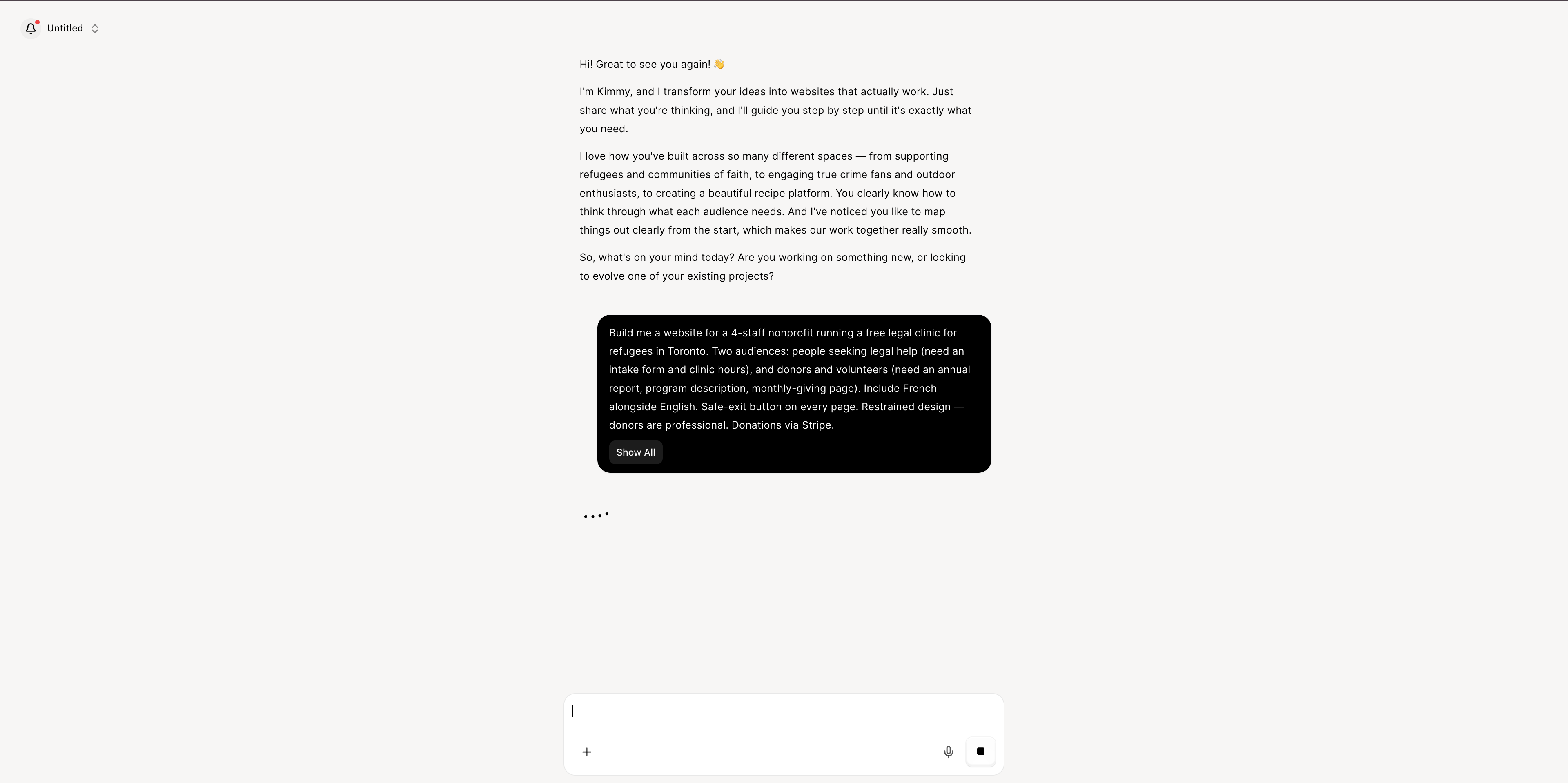
Open Wegic and chat with Kimmy, your AI project manager:
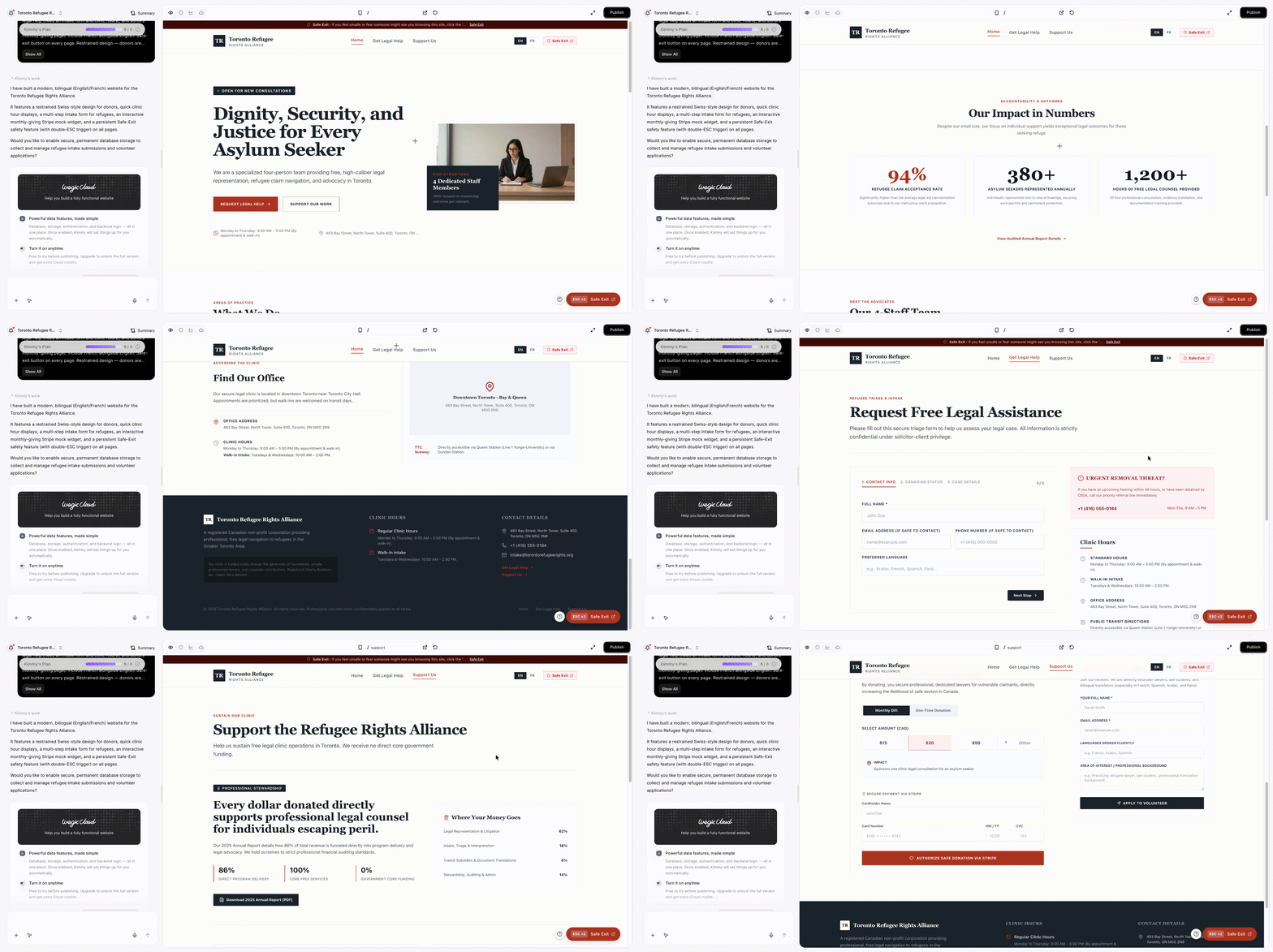
"Build me a website for a 4-staff nonprofit running a free legal clinic for refugees in Toronto. Two audiences: people seeking legal help (need an intake form and clinic hours), and donors and volunteers (need an annual report, program description, monthly-giving page). Include French alongside English. Safe-exit button on every page. Restrained design — donors are professional. Donations via Stripe."
Phase 2: AI Assembly in Under a Minute
Wegic's GPT-powered engine writes the code from scratch. In under 60 seconds you get a fully responsive multi-page nonprofit site with the donate path surfaced on every page, a clear intake form for service users, a separate funder / volunteer track, monthly recurring giving wired to Stripe or a comparable processor, mobile-first design that works on phones first, accessibility features built in, and SEO basics handled out of the box.
👇 Click below to start with Wegic
Phase 3: Edit by Conversation
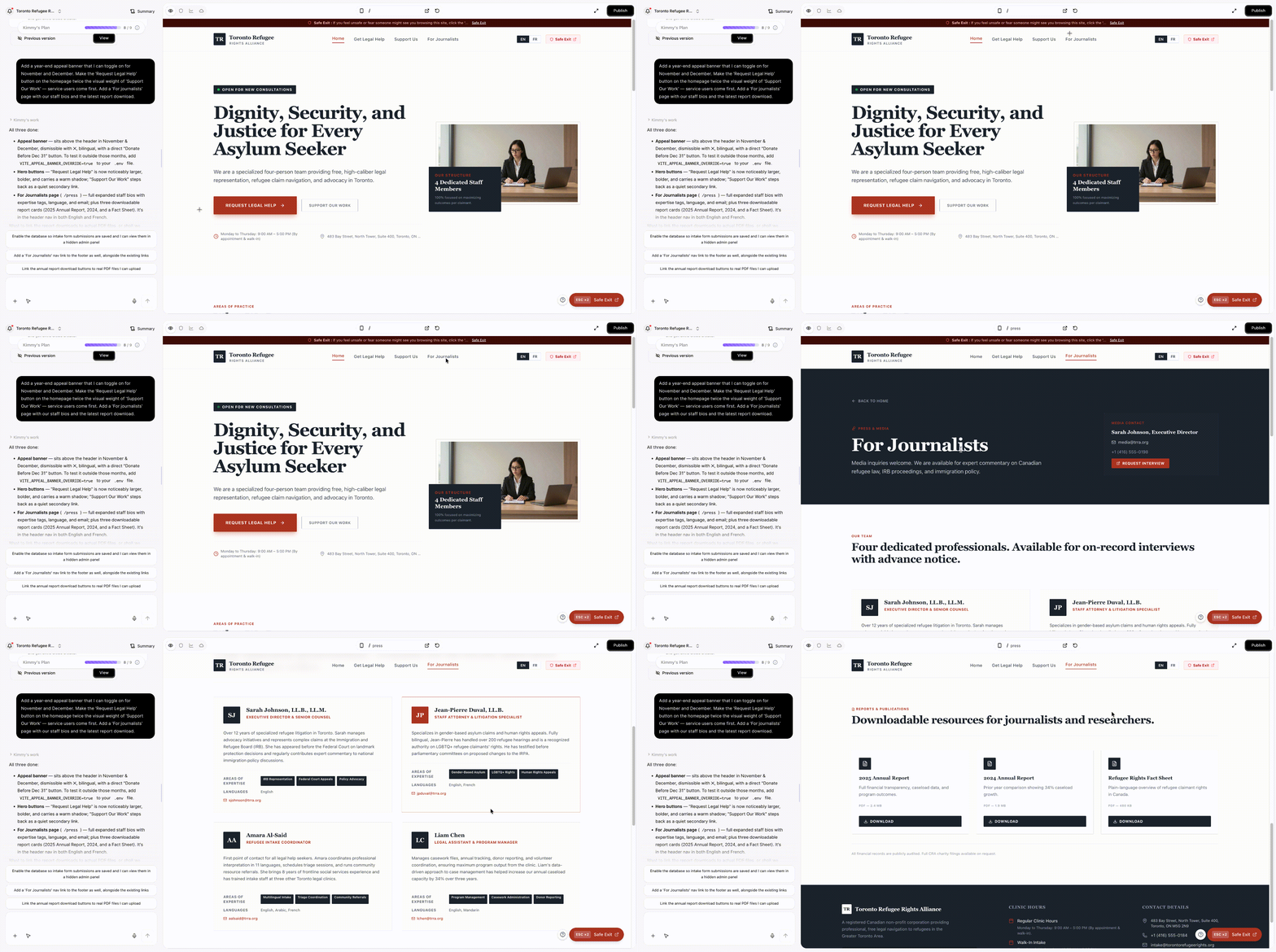
"Add a year-end appeal banner that I can toggle on for November and December. Make the 'Request Legal Help' button on the homepage twice the visual weight of 'Support Our Work' — service users come first. Add a 'For journalists' page with our staff bios and the latest report download."
Wegic proposes 2–3 design options with reasoning before applying. Mobile and desktop variants stay in sync. For deeper coverage of the conversational editing workflow, see the Wegic tutorial.
Phase 4: Publish with Hosting Included
Hit Publish. Hosting, custom domain, auto-generated
sitemap.xml, and SEO metadata are all bundled. For a side-by-side comparison of how Wegic stacks against template-based nonprofit builders on flexibility and design quality, see our in-depth review of 5 web design AI tools.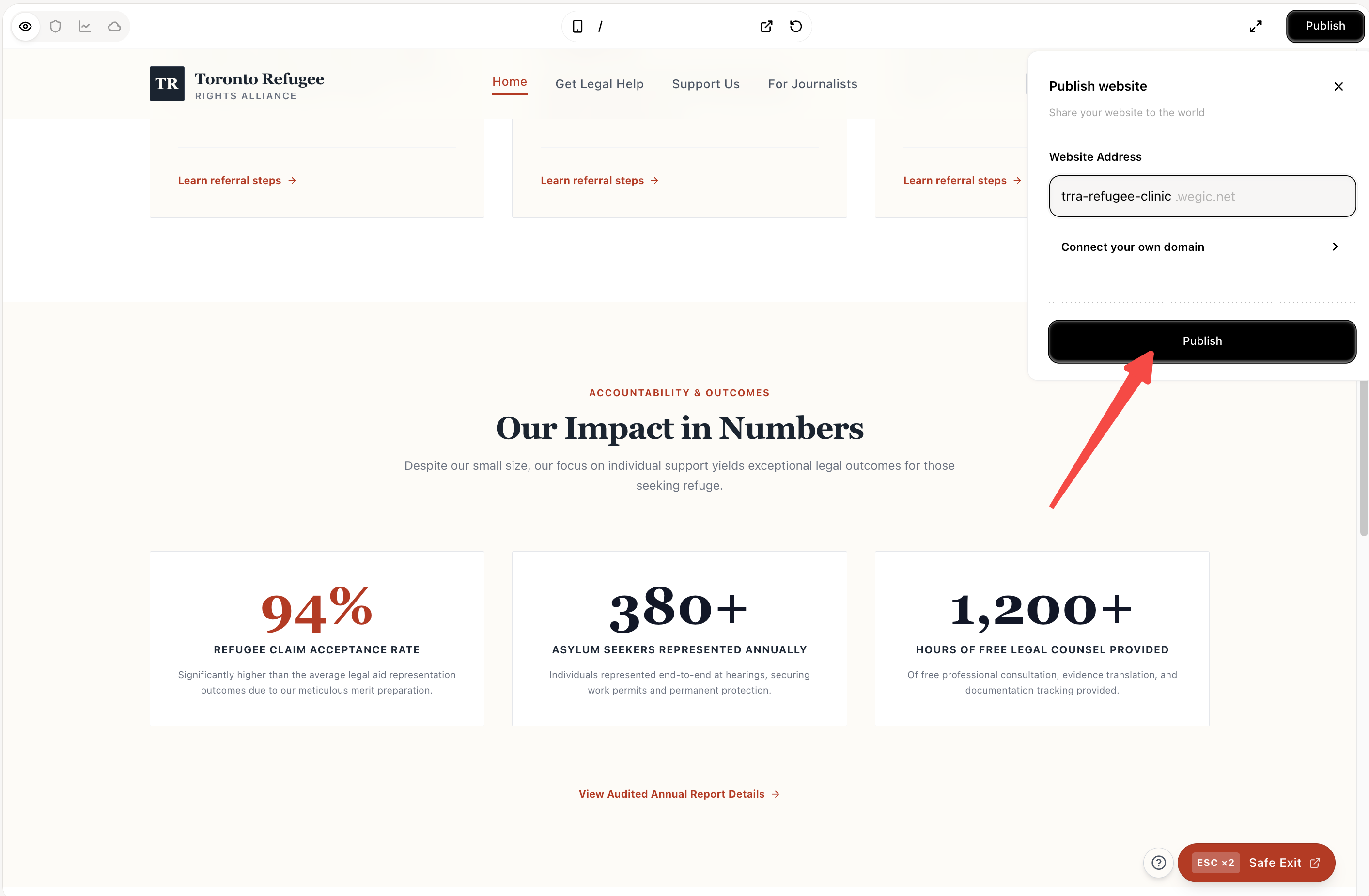
Conclusion: Match the Pattern to Your Nonprofit, Not the Template to Your Cause
The 12 nonprofit website examples in this guide work because each was matched to a specific organizational model — not pulled from a generic charity template. Wikipedia's banner-driven model works for Wikipedia because Wikipedia has a billion regular users. The Trevor Project's safety-first design works because The Trevor Project's visitors might be in immediate crisis. DonorsChoose's marketplace model works because the organization's impact really can be unbundled into individual classrooms.
If you copy a pattern that doesn't match your nonprofit, the result is a website that looks like someone else's charity. Match the pattern to your actual organization, and the website becomes a clear, honest invitation to participate — which is what good nonprofit homepage design is for.
For more design inspiration across other categories, see our broader website homepage examples guide and restaurant website examples. For technical foundations, the responsive website examples guide covers the mobile-first patterns most nonprofit sites get wrong, the website navigation examples collection covers navigation patterns directly applicable to nonprofits, and our church website examples guide covers another mission-driven category with related design challenges.
FAQs
What information should every nonprofit website include?
Eight essentials, in priority order: (1) a clear, specific statement of what you do and who you serve; (2) a donation pathway with one-time and monthly options and a clear cost-per-impact frame; (3) program pages describing what your money funds; (4) staff and board with photos, real names, and short bios; (5) financial transparency — annual report, audited accounts, and (in the US) the most recent IRS Form 990; (6) a volunteer or get-involved pathway; (7) a press / media page with current contact and press releases; (8) clear contact information including a real phone number. Optional but increasingly expected in 2026: a safe-exit button if your audience may be in unsafe environments, a service finder if you have physical locations, and a newsletter signup with multi-channel options.
What's the difference between a charity website and a nonprofit website?
The terminology varies by country. In the US, "nonprofit" covers 501(c)(3) and related tax-exempt entities; "charity" is informal. In the UK, "charity" is the legal term used by the Charity Commission for registered organizations. The website design questions are essentially the same regardless of which term applies — charity website examples and nonprofit website examples are largely interchangeable phrases in design discussion. The legal and disclosure requirements differ, however: UK charities must surface specific Charity Commission registration details; US 501(c)(3)s must make the 990 available; Canadian charities must register with the CRA.
How much should a nonprofit website cost?
It depends on size and complexity. A small charity can launch a serviceable site with an AI-powered builder for under $300/year including hosting. A mid-sized nonprofit with multiple programs, a real donation page, and a sermon archive equivalent typically spends $1,500–$8,000/year on a managed solution. A large international nonprofit with multi-country presence, fundraising compliance across jurisdictions, and full editorial team typically spends $50,000–$300,000+ on initial design and build, then ongoing development costs. The single biggest variable is whether the nonprofit needs a custom design or can use a thoughtful template.
What's the best website builder for a small nonprofit?
For small nonprofit website projects, three options dominate in 2026: AI-driven builders like Wegic generate a custom site from a description in under a minute; Squarespace and Wix have polished nonprofit templates but require manual layout work; and nonprofit-specific platforms (Wired Impact, Morweb, Soapbox Engage) bundle donation processing, email, and CRM integration. The best choice depends on whether you want design flexibility (Wegic, Squarespace), bundled fundraising tools (Soapbox, Morweb), or rock-bottom cost (Wegic's free tier).
How do I add online donations to my nonprofit website?
Three main paths: (1) Stripe or PayPal direct integration — most flexible, but you're responsible for the donation page design, tax-receipt handling, and donor management; (2) dedicated nonprofit giving platforms like Donorbox, Givebutter, GiveLively, or Classy — built for nonprofits, handle recurring giving, tax receipts, and donor records; (3) embedded donation widgets from your nonprofit CRM (Bloomerang, EveryAction, Salesforce NPSP) if you already use one. For most small nonprofits, a Donorbox or Givebutter integration offers the best balance of ease and professionalism with low fees.
Are nonprofit website templates worth using?
It depends. Nonprofit website templates from Wix, Squarespace, or platforms like Wired Impact are a fast and affordable starting point — but they tend to make every nonprofit look like every other nonprofit using the same template. If your organization has a distinctive identity (an investigative newsroom, a knowledge commons, a marketplace model), a template can flatten that identity. AI-generated sites from tools like Wegic avoid template sameness because each site is generated from your specific description, not selected from a pre-baked library.
What's a good nonprofit homepage layout?
A simple, repeatable nonprofit homepage design structure: (1) header with logo, navigation, persistent "Donate" link, and (if relevant) "Get Help" or service-access link; (2) hero with one clear primary CTA (varies by org type — for service nonprofits, this is "Find Help"; for advocacy, "Take Action"; for journalism, the latest story); (3) what we do, in plain language with real photography; (4) latest content or campaign; (5) impact numbers tied to specific outcomes (avoid vague claims like "thousands helped"); (6) ways to get involved (donate / volunteer / advocate / partner); (7) press, financials, and team in the footer. This structure works for most nonprofit types with minor reshuffling of priorities.
What are the most important nonprofit website features in 2026?
The features that consistently separate strong modern nonprofit website projects from weak ones: (1) accessibility — WCAG 2.2 AA compliance is now table stakes for serious nonprofits and a legal requirement in many jurisdictions; (2) mobile-first responsive design — over half of all traffic is mobile; (3) frictionless recurring donations via Apple Pay, Google Pay, and one-click options; (4) a real CMS that lets non-technical staff publish updates without engineering help; (5) integrated email signup linked to your CRM; (6) financial transparency one click from the homepage; (7) program-level impact reporting with specific outcomes; (8) social proof — press mentions, charity ratings (Charity Navigator, GuideStar Platinum), and real donor testimonials.