Log in
Build Your Site
How to Host a Website on GitHub (Beginner-Friendly Guide)
Learn how to host a website on GitHub step by step. A simple guide for beginners using GitHub Pages, free hosting, and github.io.
Hosting a website does not need money or advanced skills. This guide explains how to host a website on GitHub in clear steps that beginners can follow.
Many people think building a website requires expensive servers, complex software, or a degree in computer science. That is often true for big companies, but not for you. You can put your personal project online for free. This process uses a specific tool designed for sharing code and web pages. It is perfect for students, first-time builders, and small projects. You do not need to be a master programmer to get started today. All you need is a willingness to learn a few new clicks, a basic understanding of files, and the desire to share your work with the world.
Data on GitHub Usage: GitHub is one of the largest developer platforms in the world. As of 2026, GitHub has over 150 million users worldwide. GitHub Pages allows users to host a website on GitHub for free, supports HTTPS by default, and offers stable global access.
Independent web surveys show that GitHub Pages is widely used across the internet. Many beginners are able to publish a simple website quickly after setup. These facts show that GitHub Pages is reliable and beginner-friendly. It confirms that your site will stay online for the long term.

What Does It Mean to Host a Website on GitHub?
Hosting a website on GitHub means uploading your site files to a repository and publishing them online using GitHub Pages.
When you host a site this way, you are using GitHub's servers to store your files. These servers then show your files to anyone who has your link. It is different from using a website builder like Wix or Squarespace. You have full control over your files and code.
It is a great way to learn how the web actually works without paying for a hosting provider. You are essentially borrowing space on one of the world's most robust server networks. This service was originally built so developers could document their software, but it has evolved into a powerful tool for anyone to publish content.
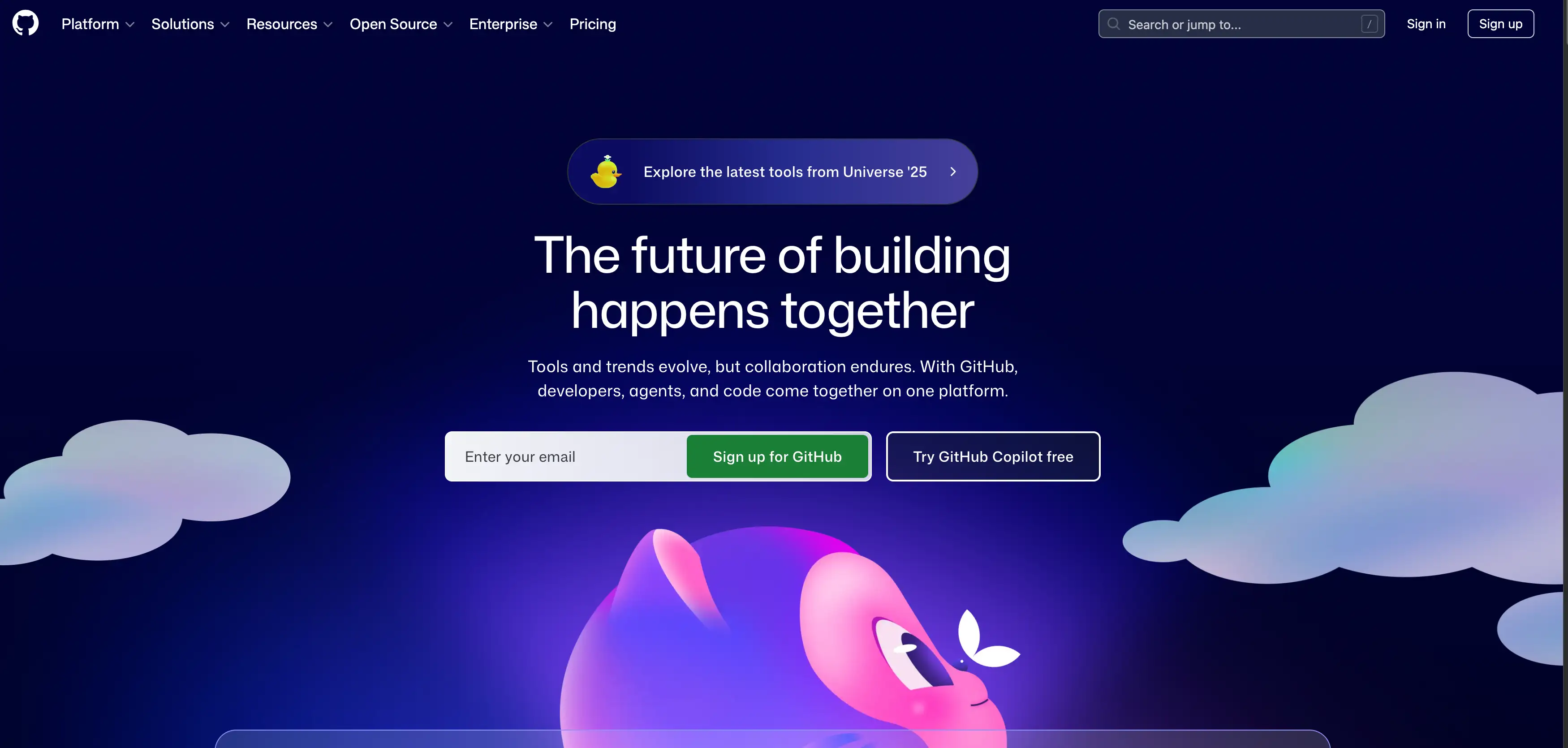
How GitHub Pages Works
GitHub Pages works by turning a folder of code into a viewable website. It takes your HTML, CSS, and image files and displays them in a browser. This system is built for "static" websites. That means the content does not change unless you change the code. You do not need to set up a complicated server. You do not need to install software like WordPress. You simply upload your files, change one setting, and your site goes live. The browser reads your files exactly as you wrote them. Because it fits so well into the coding workflow, it is widely considered the premier choice for website hosting for individual developer projects where manual control is preferred over automated wizards.
What You Can and Cannot Host
You can host many types of simple websites on this platform. It is perfect for personal portfolios where you show off your work. It works well for blogs, landing pages, and informational sites. You can even host slide decks or resume sites.
However, there are limits to what you can do here. You cannot host complex databases or backend systems. You can not run server-side code like PHP or Python databases directly. If your site needs to save user passwords, process credit card payments, or manage dynamic user inventory, you might need a different service. GitHub Pages is strictly for content that does not change based on user behavior.
Why Do People Use GitHub Pages to Host Websites?
GitHub Pages is popular because it is free, simple, and trusted by developers.
New developers love it because it removes the barrier to entry. You do not need a credit card to sign up. You do not have to worry about monthly bills. It allows you to focus entirely on learning HTML and CSS. The community aroundit is also massive, so help is easy to find. If you get stuck, thousands of tutorials are just a search away.
Host Website on GitHub Free
The biggest advantage for most people is that you can host a website on GitHub for free. Most hosting companies charge a monthly fee that adds up over time. They might also charge extra for security certificates or domain connections.
On GitHub, these features are included at no cost. There are no hidden fees for bandwidth for standard personal use. There are no ads placed on your website by the platform. You can keep your site online for years without paying a cent. This makes it ideal for students or hobbyists on a budget.
Even if you are trying to replicate the look of the best-designed website for small business examples you see online, you can often achieve professional results here just by writing good CSS code.
GitHub Host vs Traditional Hosting
The difference between a GitHub-host setup and traditional hosting is the complexity. Traditional hosting often gives you a control panel and many confusing options. You might have to manage FTP accounts or database permissions. GitHub simplifies this by using your file repository as the host.
| Feature | GitHub Pages | Traditional Hosting |
| Cost | Free | Paid (Monthly/Yearly) |
| Setup | Easy (Few clicks) | Medium (Config needed) |
| Maintenance | None | Required (Updates) |
| Best for | Static sites | Dynamic sites |
Traditional hosting is better if you are building a massive online store. However, if you are looking for the best host for small business website needs that are purely informational—like a restaurant menu or a service list—GitHub is often superior because it crashes less often and loads faster.
No code? No problem. Wegic makes AI-powered web creation easy.
What You Need Before You Start (Beginner Checklist)
Only a few basic items are needed to host a website on GitHub.
You do not need to buy anything to get started. The barrier to entry is very low. You likely already have everything you need on your computer right now.
- A GitHub Account: You need a free account to create repositories.
- Website Files: You need at least one HTML file (usually named index.html).
- Internet Browser: You need Chrome, Firefox, or Safari to view your site.
- Basic Text Editor: Notepad, TextEdit, or VS Code works fine for writing code.
Once you have these items ready, you can move to the actual steps. The process is linear and straightforward.
Step-by-Step Guide to Host a Website on GitHub
These steps show exactly how to publish your website using GitHub Pages.
Follow these instructions carefully to ensure your site loads correctly. It is easy to miss a small detail, like a file name. Take your time with each step to avoid frustration later.
Step 1: Create a GitHub Account
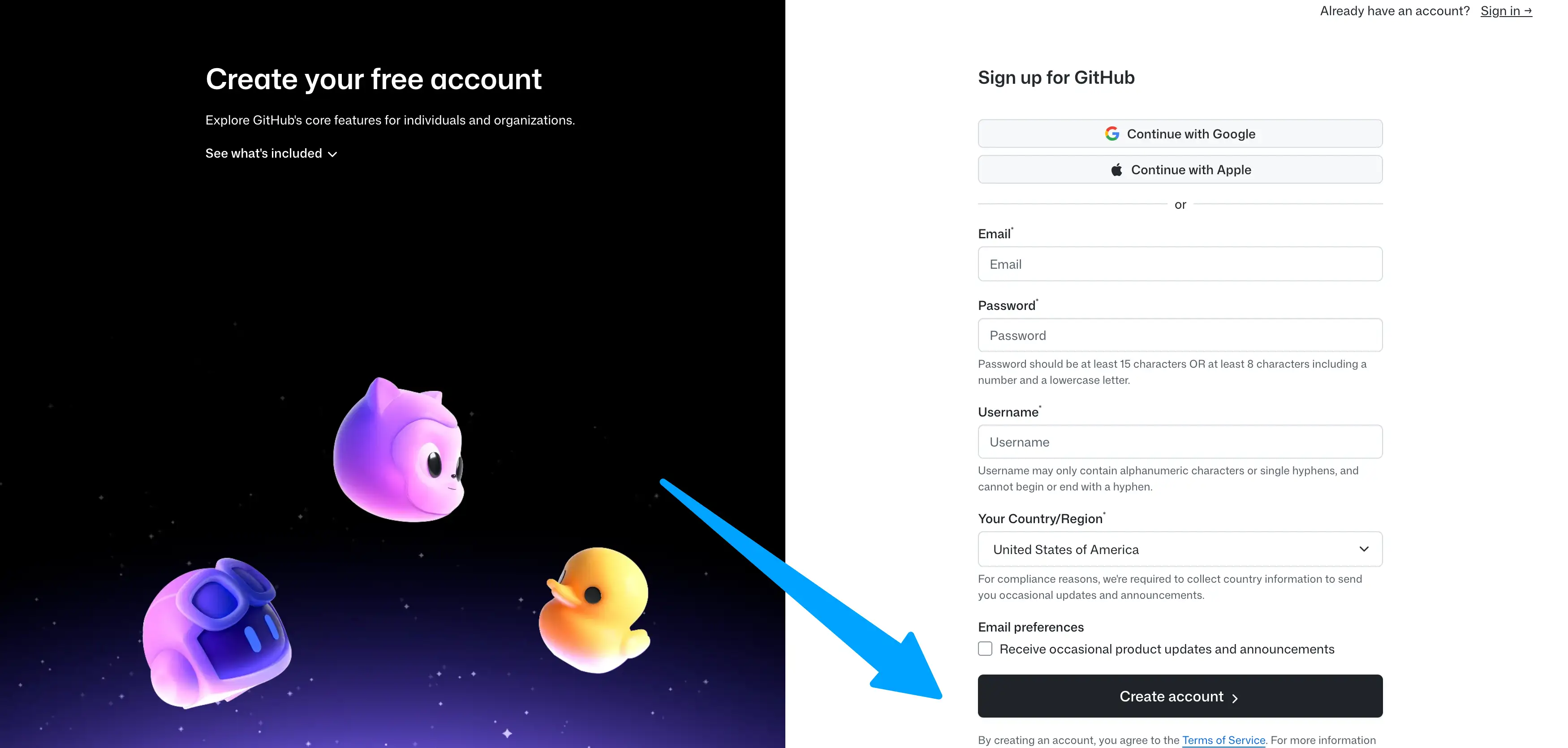
- The first step is to sign up for a free account on GitHub. Go to the main GitHub website and look for the sign-up button. You will need to provide a valid email address and create a password. You will also need to choose a username.
- Pick a username that is professional or simple, as it will be part of your website URL. Verify your email address to activate your account fully. Because this platform is free, it is arguably the cheapest website hosting solution available that does not compromise on speed or security.
Step 2: Create a New Repository
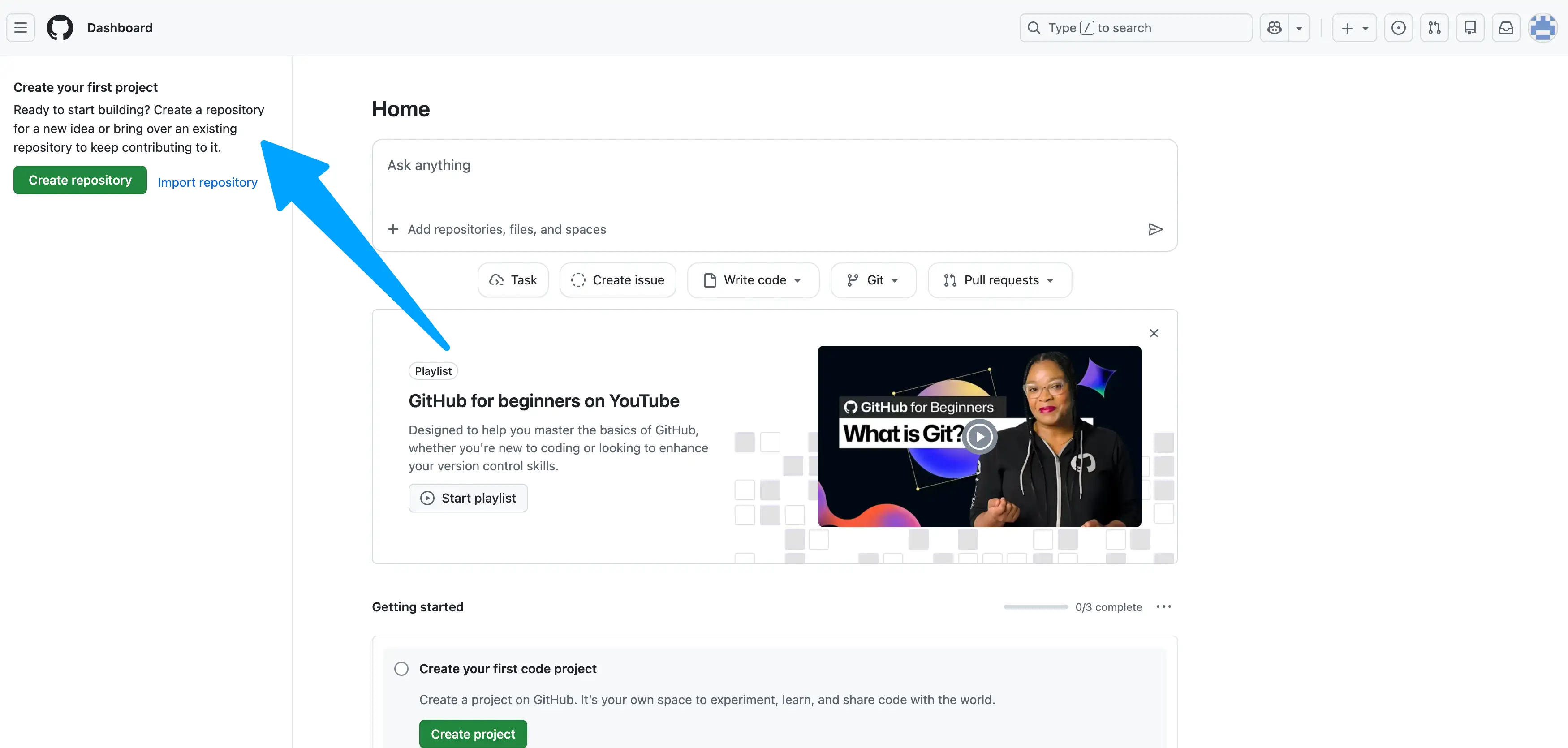
- You need a place to store your website files, which is called a repository. Look for a "+" icon in the top right corner of the dashboard. Click it and select "New repository."
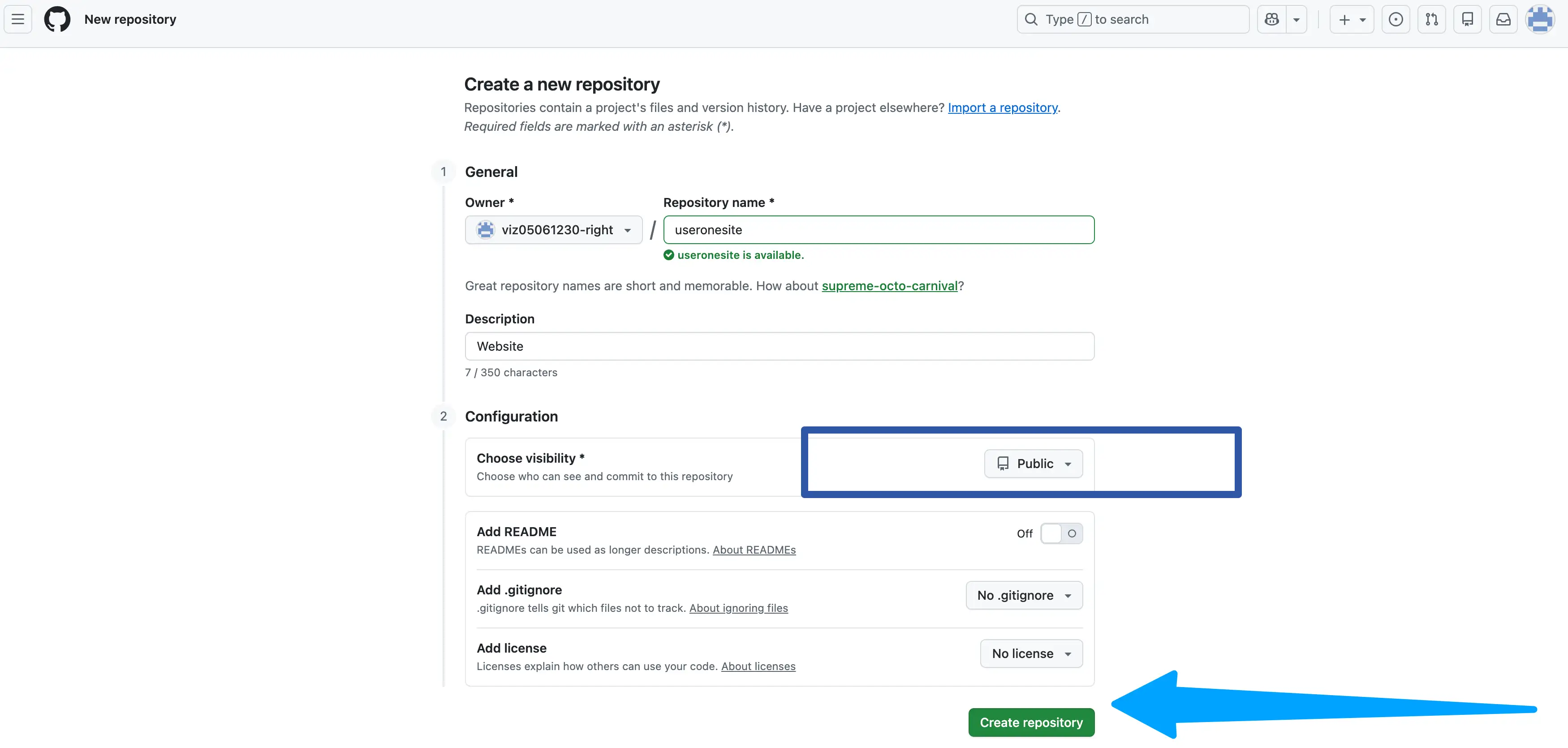
- You will see a form asking for a repository name. You can name it anything, like "my-portfolio" or "test-site." Ensure the option is set to "Public" so people can see your site. "Private" repositories can also work, but "Public" is standard for free users. Do not worry about the other settings for now. Click the green "Create repository" button at the bottom.
Step 3: Upload Website Files
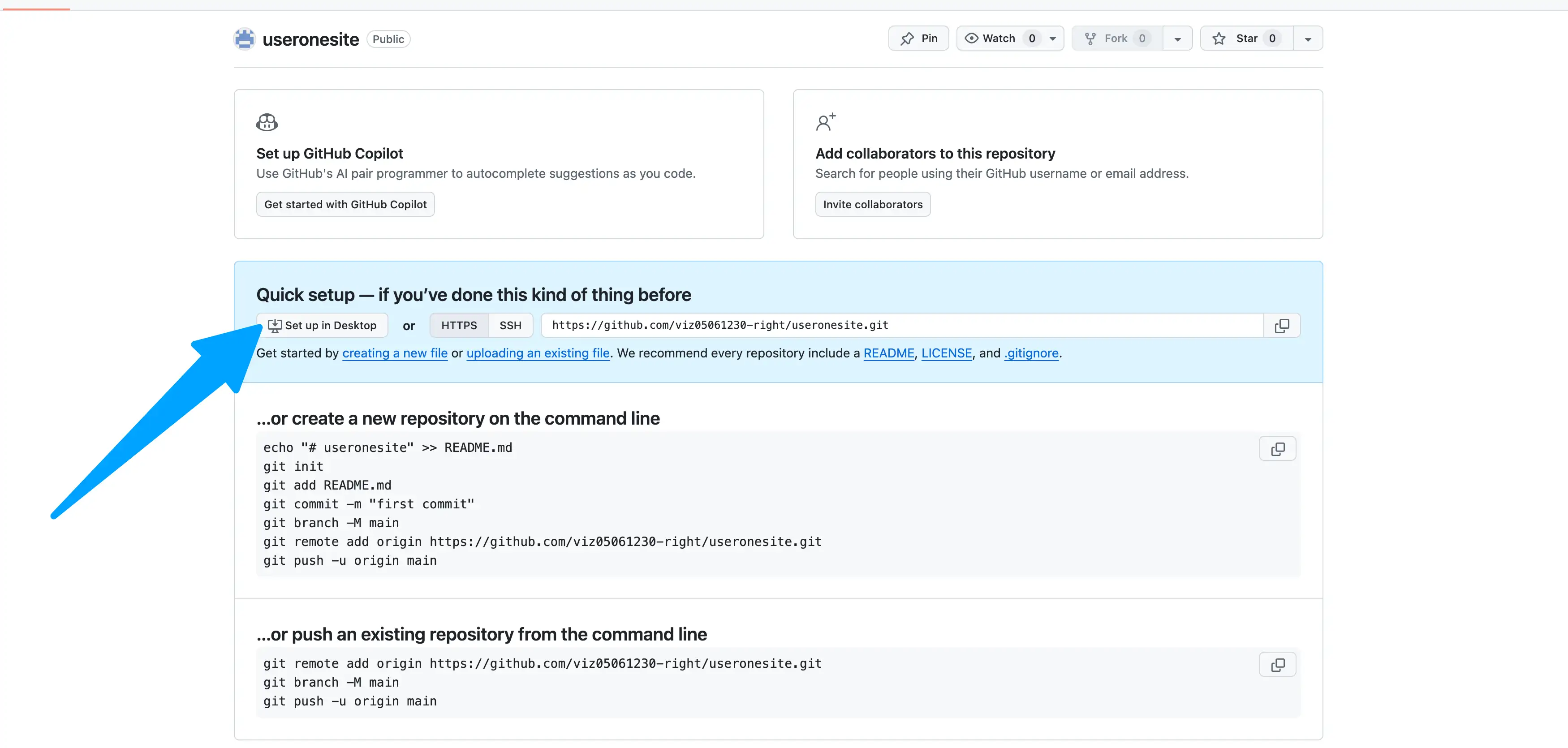
- Now you must put your HTML code into the repository you just made. You will see an option to "upload an existing file" on the screen. Click that link to open the file uploader. Drag and drop your index.html file into the box.
- It is crucial that your main file is named exactly index.html in all lowercase letters. This specific name tells the browser where to start. If you name it home.html, it might not load automatically. Add a message in the "Commit changes" box, like "Initial upload." Click the green "Commit changes" button to save your files.
Step 4: Enable GitHub Pages
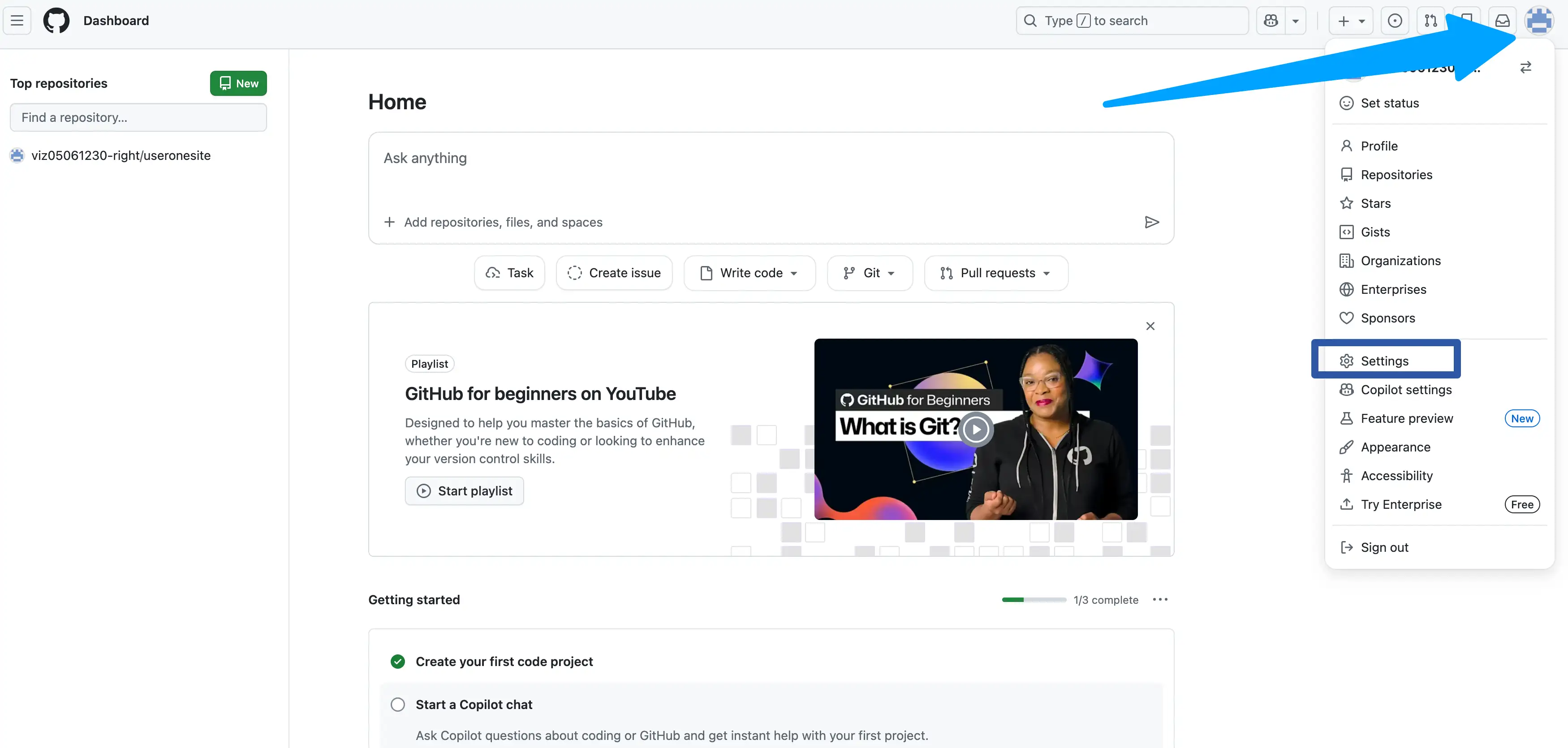
- You need to tell GitHub to treat this repository as a live website. Go to the "Settings" tab near the top of your repository page. Scroll down the left-hand menu until you find the "Pages" section. Click on "Pages" to open the configuration screen.
- Look for the section under "Build and deployment." Under "Branch," click the dropdown menu that usually says "None." Select "main" (or "master") as your source branch. Click the "Save" button to apply this change. This action triggers the servers to build your site.
Step 5: Access Your GitHub IO Link

- After a minute or two, your website will be live on the internet. Stay on the "Pages" settings screen and refresh the page. You will see a bar at the top saying your site is live.
- It will provide a URL that ends in github.io. This is your unique web address. Click that link to see your website in a new tab. You can share this link with anyone, and they can see your work.
What Is a GitHub Homepage?
A GitHub homepage is a personal site linked directly to your username.
This is slightly different from a standard project repository. It acts as the main face of your GitHub profile on the web. It is often used as a digital resume or portfolio.
Username.github.io Explained
You can create one special repository that matches your username exactly. If your username is "john-doe," you name the repo john-doe.github.io. GitHub recognizes this specific naming pattern automatically. It publishes this repository to that exact URL without extra folder names.
This makes your link short, professional, and easy to remember. It serves as your primary identity on the platform. Most developers use this for their main portfolio site.
Project Pages vs Homepage
There is a distinction between your main homepage and other project pages. Your homepage URL looks like username.github.io. A project page URL looks like username.github.io/project-name. You should use the homepage for your main introduction or CV. You should use project pages for specific apps or experiments you build.
When uploading content, always be mindful of copyright. Unlike the illegal content discussed in guides about must-knows about free movie websites and piracy, GitHub has strict terms of service. They will remove your site if you host illegal content or copyrighted files without permission.
Common Problems When Hosting on GitHub (And Fixes)
Most issues are caused by small setup mistakes that are easy to fix.
Beginners often panic when their site does not load immediately. Usually, the problem is a typo or a setting. Here are the most common things to check.
- The 404 Error: If you see a 404 error, it means the server cannot find your site. Check that your repository is set to "Public." Ensure you wait at least five minutes after setup. Sometimes the servers take a moment to update.
- Wrong File Name: Your main file must be named index.html. It cannot be named Index.html with a capital letter. Itcannot be named mywebsite.html. The system specifically looks for the lowercase index name to start with.
- CSS Styles Not Loading Sometimes, the text loads, but the colors and layout are missing. This usually happens if your link to the CSS file is broken. Check your HTML code to ensure the file path is correct. If your CSS file is in a folder, the path must include that folder name.
- Changes Not Showing. If you update your code but the live site looks old, try a hard refresh. Browsers often save a copy of the site to load it faster. Hold down Ctrl + Shift + R (or Cmd + Shift + R) to force a reload. This clears the old cache and shows the new version.
Is GitHub Hosting Good for Beginners Long Term?
GitHub Pages is ideal for learning, but it has limits as you grow.
It is the best place to start your journey in web development. It teaches you the basics of file management and deployment. However, you should know its strengths and weaknesses.
Advantages of GitHub Hosting
The main advantage is the cost and stability. You get a reliable GitHub host environment for free forever. The uptime is excellent because it runs on Microsoft's massive infrastructure. It is also very secure by default. You do not need to worry about hackers stealing server access. It is great for low-traffic sites that do not change often.
Disadvantages to Consider
The platform is not built for running a business or a complex app.You cannot use it to run an online store with a checkout cart. You cannot use it for a blog that needs a database for comments. It does not support server-side languages like PHP.
Customization of the server settings is basically nonexistent. Eventually, if you want to create business websites with dynamic features like user logins, shopping carts, or real-time inventory systems, you will need to migrate to a paid hosting provider that supports backend code.
GitHub Pages vs Other Free Website Hosting Options
GitHub Pages is one of several free hosting choices available today.
It is important to compare it with other popular services. Other tools might be better if you prefer drag-and-drop builders. However,for code-based sites, GitHub is a top contender.
Netlify and Vercel are also excellent for hosting static sites. They connect to GitHub but offer more automated features. However, GitHub Pages keeps everything in one place, which is simpler for beginners.
Who Should Use GitHub to Host a Website?
GitHub hosting fits learning and small projects perfectly. It is not designed for everyone, but it serves a specific group well. If you are comfortable looking at code, it is for you.
- Students and Learners: If you are learning to code, this is an essential tool. It teaches you version control, which is a job skill. It gives you a live link to show your teacher or friends.
- Job Seekers and Designers, you can host a professional resume or portfolio here. It looks impressive to employers because it shows technical literacy. A simple static site loads fast and looks clean.
- Open Source Documentation: Many developers use it to host instructions for their software. If you write code for others, this is the standard way to explain it. It keeps the manual right next to the code itself.
Conclusion
GitHub Pages makes website hosting simple and accessible for everyone.
It removes the barrier of cost and complexity. You can set up a professional-looking site in minutes. It is a valuable skill that serves students and professionals alike.
If you want to build a site faster without writing code, tools like Wegic can help. Wegic uses AI to create websites and is useful for beginners who want quick results with less setup. It bridges the gap between coding from scratch and using a standard builder. It allows you to get online fast while still having an effortless modern design. This is a great alternative if you find HTML too difficult at first.
Smart tools, simple setup, Stunning result. Explore Wegic’s official site.💡
FAQ – Hosting a Website on GitHub
Q1: Can I host a website on GitHub for free forever?
Yes. GitHub Pages offers free hosting without time limits. You do not have to pay after a trial period ends. It remains free as long as your repository is public.
Q2: Do I need coding skills to use this?
Basic HTML knowledge is enough to start. You do not need to be an expert programmer. You can even download free templates and upload them without writing code yourself.
Q3: What is GitHub.io used for in the URL?
It is the public domain extension for sites hosted on GitHub. It tells visitors that your site is hosted on GitHub's servers. It is a sign of a personal or developer project.
Q4: Is GitHub Pages safe for my visitors?
Yes, it includes HTTPS security by default. This means the connection between your site and the visitor is encrypted. Your visitors will see a lock icon in their browser bar.
Q5: Can I use a custom domain name?
Yes, GitHub supports custom domains for free. You can buy a name like myname.com and link it. You just need to change a setting in the Pages menu.
Q6: Can I host a private website?
Free accounts generally require the repository to be public. If you want a private site that only you can see, you may need a Pro account. However, public hosting is fine for most personal sites.
Q7: How much traffic can my site handle?
GitHub Pages has a soft limit of 100GB of bandwidth per month. This is enough for thousands of visitors. If you go viral, they might ask you to move services.
Written by
Kimmy
Published on
Mar 17, 2026
Share article
Read more
Our latest blog
Webpages in a minute, powered by Wegic!
With Wegic, transform your needs into stunning, functional websites with advanced AI
Free trial with Wegic, build your site in a click!
What kind of website do you want to build?