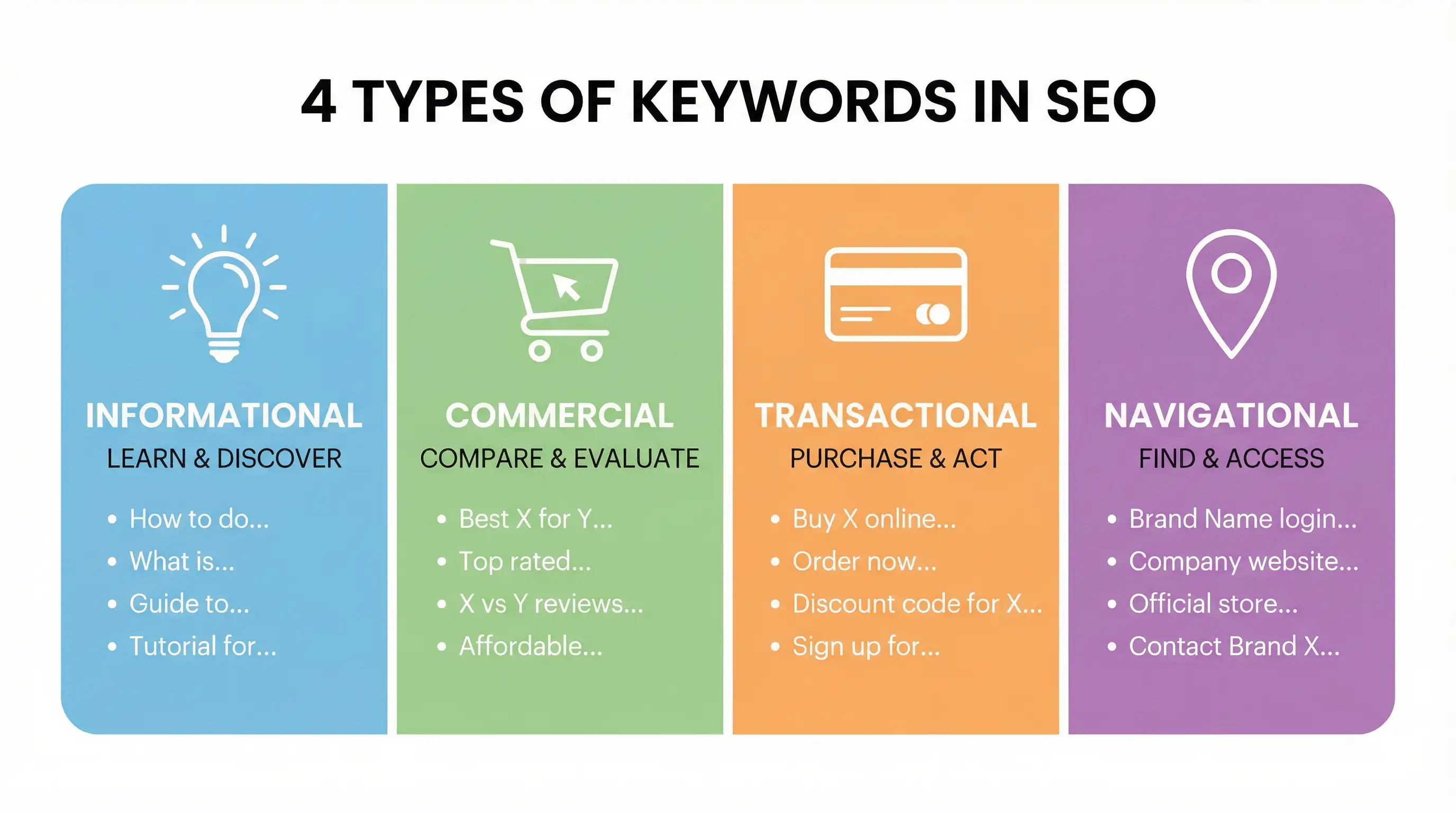
Las palabras clave se dividen en cuatro tipos principales según la intención del usuario: Informacional ("cómo hacer"), Comercial ("mejor X"), Transaccional ("comprar ahora") y Navegacional ("inicio de sesión de Wegic"). Las palabras clave de largo alcance (3 o más palabras) tienen menos competencia y tasas de conversión más altas. Piense en "constructor de sitios web de IA Wegic" en lugar de simplemente "Wegic". Para usar sus palabras clave seleccionadas, no necesita ser un experto en SEO. Un
constructor de sitios web de IA como Wegic le ayuda a realizar una auditoría completa de SEO, agregar su código de seguimiento de Google Analytics y configurar un mapa del sitio directamente mientras construye su sitio web.
Conocer dónde colocar sus palabras clave (títulos, encabezados, URLs, texto alternativo) es tan importante como conocer qué palabras clave usar.
4 Tipos Fundamentales de Palabras Clave por Intención de Búsqueda
El concepto más importante en la investigación de palabras clave es la intención de búsqueda. Es la "por qué" detrás de una búsqueda. Cuando entiende qué intenta lograr un usuario, puede crear el contenido perfecto para satisfacer sus necesidades. Hay cuatro categorías principales.
Palabras Clave Informacionales
Estas son las palabras clave que las personas usan cuando quieren aprender algo. Buscan respuestas, explicaciones o guías. Todavía no están listos para comprar; están en la fase de investigación y conciencia.
Ejemplos de palabras clave para sitios web:
"cómo comenzar un podcast"
"¿qué es sin gluten?"
"ideas para remodelar un baño pequeño"
"¿cuáles son los diferentes tipos de palabras clave?"
¿Por qué es importante? Aunque estas palabras clave no llevan directamente a ventas, son esenciales para construir confianza y autoridad. Al proporcionar información valiosa, posiciona su marca como experta. Este es contenido de la parte superior del embudo que presenta a las personas su marca.
Palabras Clave Comerciales
Los usuarios que buscan con palabras clave comerciales están investigando productos, servicios o marcas. Tienen intención de comprar pronto, pero aún están en la fase de comparación y consideración. Buscan reseñas, comparaciones y las "mejores" opciones.
Ejemplos de palabras clave para sitios web:
"mejor cámara 4k de bajo costo"
"comparación de Wegic vs. Wix"
"mejor software de gestión de proyectos"
"reseñas de servicios de entrega de comidas"
¿Por qué es importante? Es aquí donde puede guiar a un cliente potencial hacia su solución. El contenido que apunta a estas palabras clave, como reseñas detalladas o páginas de comparación, puede ser muy persuasivo y capturar a usuarios que están cerca de tomar una decisión.
Palabras Clave Transaccionales
Este es la parte inferior del embudo. El usuario tiene su billetera lista y está listo para tomar acción. Estas palabras clave tienen una intención clara de comprar, suscribirse, registrarse o descargar.
Ejemplos de palabras clave para sitios web:
"comprar MacBook Pro M3"
"descuento para el plan profesional de Wegic"
"regístrate para una prueba gratuita"
"ordenar entrega de pizza cerca de mí"
¿Por qué es importante? Estas son sus palabras clave que generan dinero. Deben llevar directamente a páginas de productos, páginas de precios o páginas de destino donde se pueda realizar una transacción. Optimizar para estas palabras clave es crítico para impulsar ingresos.
Palabras Clave Navegacionales
Un usuario con intención navegacional intenta llegar a un sitio web o página específico. Ya conoce la marca o sitio que busca y solo está usando el motor de búsqueda como atajo.
Ejemplos de palabras clave para sitios web:
¿Por qué es importante? Aunque naturalmente clasificarás para tu propio nombre de marca, optimizar para términos de navegación asegura que los usuarios puedan encontrarte fácilmente. Esto incluye tener páginas de contacto claras, portales de inicio de sesión y un sitio bien estructurado para que Google pueda mostrar enlaces relevantes del sitio.
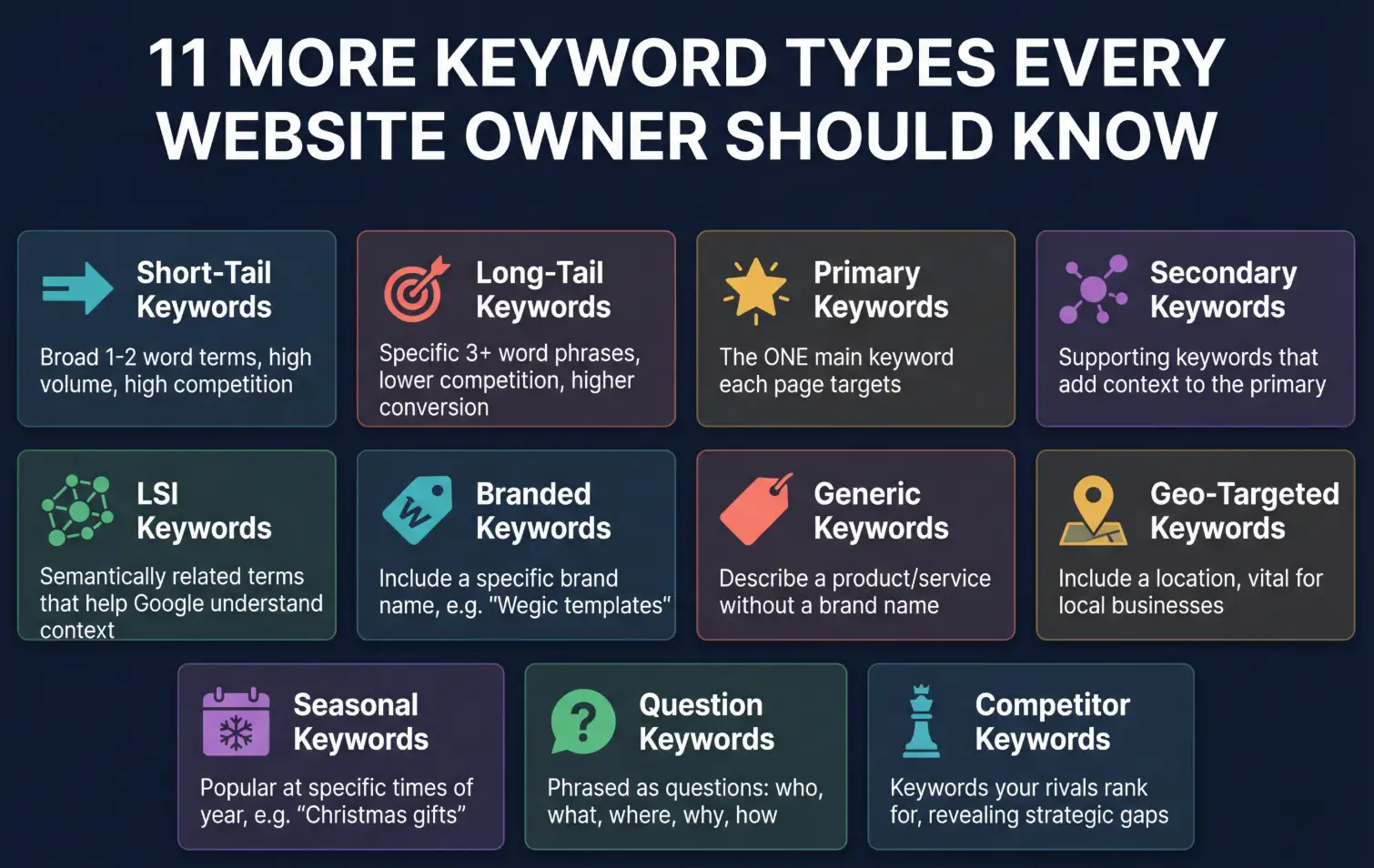
11 Más Tipos de Palabras Clave que Todo Propietario de Sitio Web Debe Conocer
Más allá de los cuatro intenciones principales, las palabras clave se pueden categorizar de varias maneras útiles.
1. Palabras clave cortas vs. palabras clave largas
Palabras clave cortas (o "cabeza"): Palabras clave amplias, de 1-2 palabras, con alto volumen de búsqueda y alta competencia (por ejemplo, "zapatos", "marketing"). Son difíciles de clasificar, y su intención a menudo no es clara.
Palabras clave largas: Frases muy específicas, de 3 o más palabras, con bajo volumen de búsqueda pero mucha menor competencia y tasas de conversión más altas (por ejemplo, "botas de senderismo impermeables para mujeres del tamaño 8"). Investigaciones de
Ahrefs muestran que las palabras clave largas representan una parte significativa de todas las búsquedas de Google, destacando su importancia para nuevos sitios web.
citación
2. Palabras clave principales vs. secundarias
Principal: La palabra clave principal que deseas que una página específica clasifique. Cada página debe tener solo una palabra clave principal. (Por ejemplo, "constructor de sitio web de IA" para una página de inicio).
Secundaria: Palabras clave y frases relacionadas que respaldan la palabra clave principal. Añaden contexto y permiten clasificar para una gama más amplia de consultas en la misma página (por ejemplo, "mejor creador de sitio web de IA", "constructor de sitio web fácil con IA").
3. Palabras clave LSI (Índice Semántico Latente)
Estos son términos y frases que son semánticamente relacionados con tu palabra clave principal. Google los utiliza para entender el contexto de tu contenido. Para un artículo sobre "automóviles", las palabras clave LSI serían "motor", "neumáticos", "conducción" y "carretera". Ayudan a evitar el relleno de palabras clave, mientras demuestran profundidad temática.
4. Palabras clave de marca vs. generales
De marca: Palabras clave que incluyen un nombre de marca (por ejemplo, "plantillas de Wegic", "Air Force 1 de Nike").
Generales: Palabras clave que describen un producto o servicio sin mencionar una marca (por ejemplo, "plantillas de sitio web", "zapatos blancos").
5. Palabras clave geolocalizadas
Estas palabras clave especifican una ubicación, siendo vitales para negocios locales. Ejemplos incluyen "fontanero en San Diego" o "mejor cafetería cerca de mí".
6. Palabras clave estacionales
Estas palabras clave son populares durante momentos específicos del año. Piensa en "ideas para regalos de Navidad", "disfraces de Halloween para perros" o "ofertas de vacaciones de verano".
7. Palabras clave en forma de pregunta
Estas son palabras clave formuladas como una pregunta, generalmente comenzando con "¿quién?", "¿qué?", "¿dónde?", "¿cuándo?", "¿por qué?" o "¿cómo?". Son perfectas para artículos de blog y secciones de preguntas frecuentes, y a menudo aparecen en las cajas de "Personas también preguntan" de Google.
8. Palabras clave de competidores
Estas son palabras clave que tus competidores están utilizando y clasificando. Analizarlas puede revelar lagunas en tu propia estrategia y oportunidades para crear mejor contenido.
9. Palabras clave nuevas/tendencia
Estas son palabras clave recientemente populares relacionadas con eventos actuales, tendencias o noticias virales. Pueden generar un gran impulso de tráfico a corto plazo si puedes crear contenido rápidamente.
10. Palabras clave de baja competencia
A menudo son de cola larga y específicos, estos son términos que menos sitios web intentan clasificar. Son la "fruta baja" para nuevos sitios web que buscan ganar tracción y autoridad inicial.
11. Palabras clave de comprador
Este es otro nombre para las palabras clave transaccionales y comerciales. Indican que el usuario está en el ciclo de compra y son muy valiosas para negocios de comercio electrónico y servicios.
Cómo investigar y utilizar palabras clave con Wegic
La teoría es buena, pero ¿cómo encuentras realmente estas palabras clave y las usas para construir un sitio web que obtenga tráfico? Es aquí donde un constructor de sitios web de inteligencia artificial como Wegic se convierte en tu arma secreta. No necesitas una agencia ni un título de diseño para hacer esto.
Vamos a recorrer cómo puedes crear un sitio web y integrar el SEO desde el primer día.
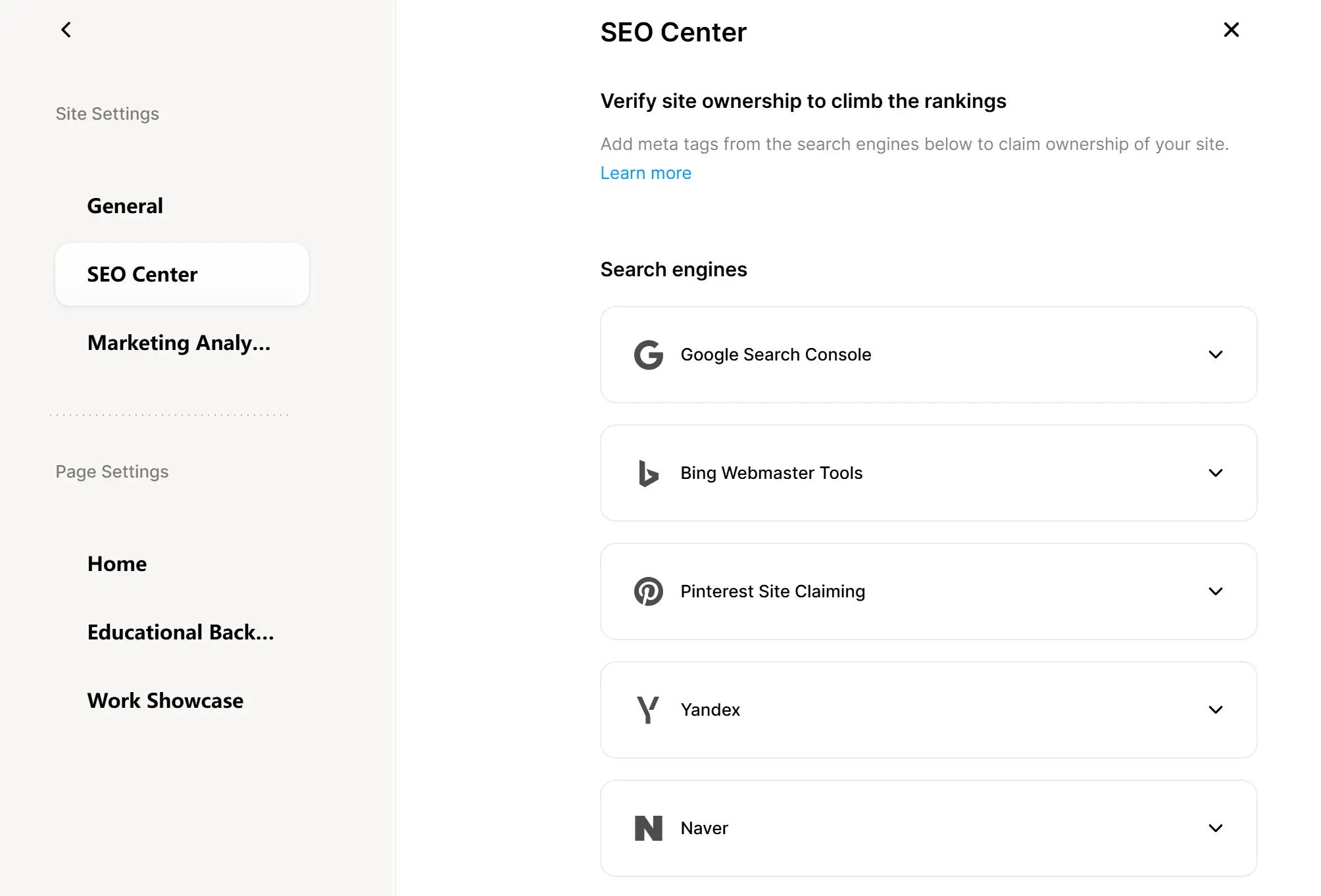
Conocer los diferentes tipos de palabras clave es solo el comienzo. El verdadero desafío es aplicarlas en tu sitio web actual. El Centro de SEO de Wegic entra en acción, ayudándote a optimizar tu sitio en un solo lugar.
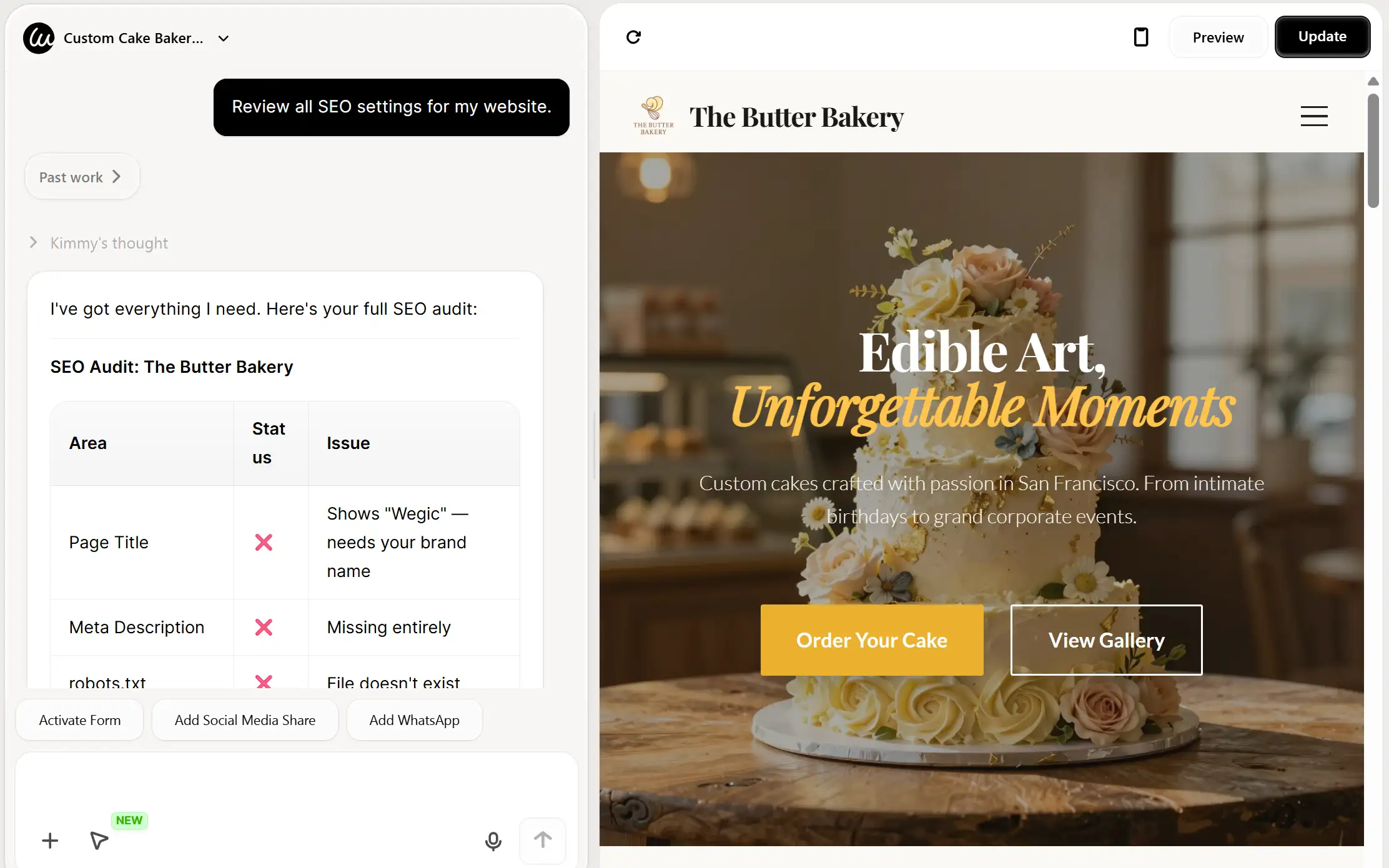
Paso 1: Realizar una auditoría completa de SEO
Una vez que tu sitio web esté construido, Wegic puede realizar una auditoría de SEO completa para revisar tu estado actual de optimización. Esta auditoría revisa tus títulos de página,
metadatos, estructura de URL, texto alternativo de imágenes y estructura general del sitio.
Para iniciar la auditoría, simplemente pídele a Wegic que "Revisar todos los ajustes de SEO para mi sitio web" o "Verificar los títulos, descripciones, palabras clave, texto alternativo y estructura general." La inteligencia artificial escaneará tu sitio y identificará áreas de mejora.
Paso 2: Optimiza tus títulos y descripciones
Según los resultados de la auditoría, querrás perfeccionar los títulos de página y las descripciones meta para incluir tus palabras clave objetivo de forma natural.
Página principal: Incluye tu servicio principal + ubicación
Páginas de servicio: Usa palabras clave específicas que describan lo que ofreces
Página sobre nosotros: Combina la marca personal con palabras clave relevantes
Wegic te permite editar elementos directamente. Puedes chatear con Kimmy para cambiar cualquier sección que quieras en tu sitio web.
Paso 3: Configura Google Analytics
Para rastrear cómo están funcionando tus palabras clave, querrás conectar
Google Search Console a tu sitio Wegic. Esto está disponible en el Plan Pro y te permite ver qué páginas visitan los usuarios con más frecuencia, rastrear de dónde proviene el tráfico y comprender cómo interactúan los visitantes con tu contenido.
Para agregar Google Analytics, obtén tu código de seguimiento (que se parece a G-XXXXXXXXXX) de tu cuenta de Google Analytics, luego compártelo con Wegic. La plataforma lo insertará directamente en tu sitio y comenzarás a recopilar datos de inmediato.
Paso 4: Envía tu mapa del sitio a Google
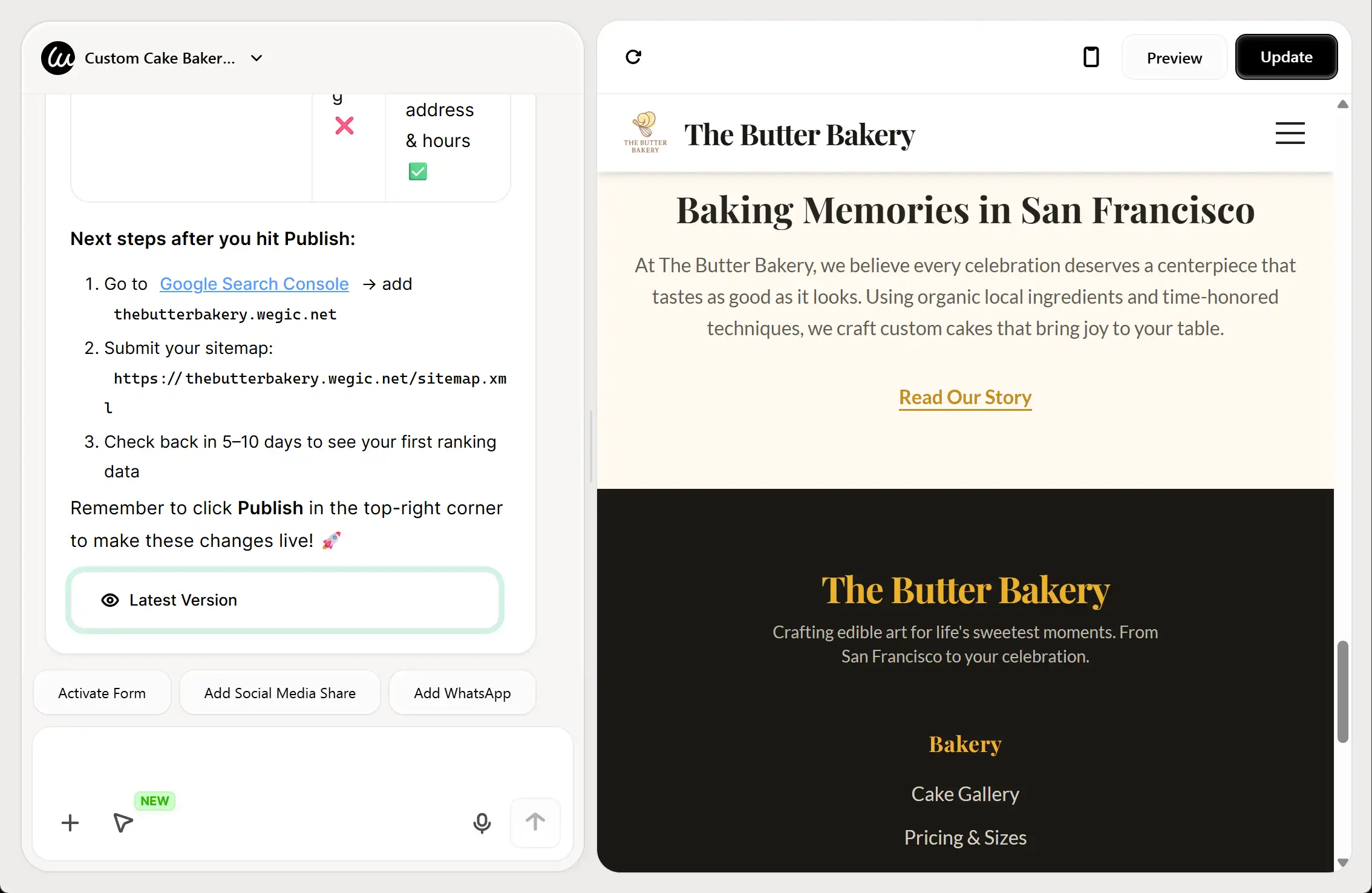
Un mapa del sitio ayuda a Google a encontrar e indexar todas tus páginas más rápidamente. Wegic genera un mapa del sitio para tu sitio automáticamente. Para enviarlo, primero verifica tu sitio con Google Search Console agregando una etiqueta meta a tu sitio de Wegic. Una vez verificado, envía la URL de tu mapa del sitio a Google Search Console. Esto le indica a Google sobre todas tus páginas, ayudándolas a aparecer en los resultados de búsqueda más pronto.
Recuerda que el indexado puede tardar una semana o más después de enviar tu mapa del sitio, y Google no indexará ninguna página que esté protegida con contraseña.
Paso 5: Mantén las URLs limpias y simples
Wegic te ayuda a mantener estructuras de URL limpias. Si tus URLs ya están trayendo tráfico SEO, evita cambiarlas solo por optimización. Hacerlo podría afectar negativamente tus clasificaciones. Para nuevas páginas, busca URLs cortas y descriptivas que incluyan tu palabra clave principal (por ejemplo, /austin-wedding-packages en lugar de /page-id-123).
Dónde colocar las palabras clave para un mayor impacto en el SEO
Conocer qué palabras clave usar es solo la mitad de la batalla. También necesitas saber dónde colocarlas. Aquí tienes una guía rápida.
Errores comunes de palabras clave que debes evitar
Al comenzar, es fácil caer en algunos errores comunes. Evita estos errores:
Palabras clave excesivas: No repitas tu palabra clave una y otra vez de manera artificial. Hace que tu contenido sea ilegible y puede hacerte penalizar por Google. Un porcentaje de densidad de palabra clave del 1-2% es suficiente.
Ignorar la intención de búsqueda: No intente clasificar una página de producto para una palabra clave informativa. Tendrás altas tasas de rebote, lo que le dice a Google que tu página no es una buena coincidencia.
Dirigirse solo a palabras clave de alta competencia: No vayas tras "fotografía" cuando estés empezando. Nunca clasificarás. Enfócate en palabras clave de baja competencia y de largo alcance primero para generar impulso.
Olvidar seguir el rendimiento: El SEO no es "configúralo y olvídate". Usa herramientas como Google Search Console (es gratis) para ver qué palabras clave estás clasificando y ajustar tu estrategia.
Cannibalización: No vayas tras la misma palabra clave principal en varias páginas. Esto confunde a Google, obligándolo a elegir qué página es más importante, y a menudo significa que ninguna clasificará bien.
El tráfico de tu sitio web comienza con las palabras correctas
Tipos diferentes de palabras clave subrayan cualquier
estrategia de SEO exitosa. Son el puente entre lo que ofreces y lo que buscan tus clientes.
Al enfocarte en la intención de búsqueda, seleccionar una mezcla de palabras clave informativas y comerciales, y aprovechar el poder de las frases de largo alcance, puedes comenzar a atraer el tipo correcto de tráfico.
Constructores de sitios web de inteligencia artificial para principiantes, como
Wegic, han revolucionado este proceso. En lugar de manejar hojas de cálculo y software complejo, puedes crear un sitio web potente y optimizado para SEO y desplegar fácilmente tus palabras clave en tus páginas. Wegic te ayuda a auditar, optimizar y seguir el rendimiento de tu sitio, para que puedas enfocarte en dirigir tu negocio.
Listo para dejar de ser invisible?
Crea un sitio web con Wegic hoy y comienza a convertir las búsquedas de tus clientes ideales en tu próxima historia de éxito.
Preguntas frecuentes
¿Cuál es un ejemplo de palabra clave de sitio web?
Un buen ejemplo de palabra clave de sitio web depende de la intención del usuario. Para una cafetería, una palabra clave informativa podría ser "cómo se hace el cold brew", una palabra clave comercial podría ser "mejor máquina de espresso para el hogar" y una palabra clave transaccional podría ser "comprar café entero en línea".
¿Cuántos tipos de palabras clave hay en el SEO?
Aunque hay docenas de subtipos, los profesionales de SEO generalmente se enfocan en cuatro tipos principales de palabras clave basados en la intención de búsqueda: informativo, comercial, transaccional y navegacional. Otras categorías importantes se basan en la longitud (palabras clave cortas frente a palabras clave de largo alcance) y en la especificidad (marca, geolocalización).
¿Qué son las palabras clave LSI con ejemplos?
Las palabras clave LSI (Índice Semántico Latente) son palabras y frases conceptualmente relacionadas con tu tema principal. Para la palabra clave principal "coche", los ejemplos de LSI serían "motor", "conducción", "carretera", "neumáticos", "velocidad" y "vehículo". Ayudan a Google a entender el contexto de tu contenido sin que tengas que repetir "coche" una y otra vez.
¿Cómo encuentro palabras clave para mi nuevo sitio web?
Comience pensando en palabras clave iniciales relacionadas con sus productos o servicios. Piense como un cliente: ¿qué buscaría? Use herramientas gratuitas como la sección "Preguntas también preguntadas" de Google y las "búsquedas relacionadas". Una vez que tenga sus palabras clave, use un constructor de sitios web de inteligencia artificial como Wegic para crear su sitio y colocar fácilmente esas palabras clave en sus páginas, títulos y descripciones.
¿Cuál es la diferencia entre palabras clave de corta y larga cola?
Las palabras clave de corta cola son frases de 1-2 palabras generales con alta competencia (por ejemplo, "seguro"). Las palabras clave de larga cola son frases específicas de 3 o más palabras con menor competencia e intención más clara (por ejemplo, "seguro de vida asequible para padres recién nacidos"). Los nuevos sitios web deben enfocarse en palabras clave de larga cola para obtener tracción inicial. Según investigaciones de
Backlinko, estas frases más largas y específicas suelen llevar a tasas de conversión más altas porque la intención del buscador es muy clara.