Accesso
Construye Tu Sitio
Cómo los desarrolladores de juegos independientes usan sitios de una sola página para obtener más descargas de aplicaciones
¡Aumente rápidamente las descargas de su aplicación de ajedrez o aplicación de aprendizaje de ajedrez! Cree un sitio de una sola página impresionante con Wegic AI: muestre jugadas, características y obtenga más usuarios.
Si creaste una aplicación de ajedrez o un pequeño juego para móviles, es probable que la hayas subido a la tienda de aplicaciones de ajedrez y esperaras que la gente la descargara. Pero después de unas semanas, los números se sienten lentos. La cantidad de descargas de la aplicación de ajedrez no crece como esperabas. La página de la App Store es muy limitada. No puedes subir videos largos, GIFs divertidos o tutoriales completos para mostrar por qué tu juego es especial.
Esto es aún más difícil si creaste una aplicación para aprender ajedrez con lecciones inteligentes y tácticas. Los jugadores no pueden ver la verdadera profundidad de tu juego solo con unas cuantas capturas de pantalla. Por eso muchos desarrolladores independientes ahora usan páginas web de una sola página. Una página simple y enfocada puede mostrar el juego, las características y un botón de descarga claro, todo en un solo lugar.
#01 ¿Estás perdiendo descargas de aplicaciones porque las páginas de la tienda de aplicaciones son demasiado limitadas?

Trabajaste duro en tu juego. Quizás creaste una aplicación para aprender ajedrez con lecciones inteligentes, acertijos y consejos de estrategia. Quizás sea una aplicación de ajedrez gratuita que incluso funciona como una aplicación de ajedrez sin conexión, para que los jugadores puedan practicar en cualquier lugar. La subes a la tienda de aplicaciones de ajedrez, escribes una breve descripción, añades algunas capturas de pantalla y esperas a que aumenten las descargas de la aplicación de ajedrez. Pero nada realmente sucede.
El problema no es tu juego. El problema es la página. Las páginas de la App Store son muy limitadas. No puedes subir videos de juego largos. No puedes mostrar tácticas paso a paso con GIFs animados. No puedes explicar por qué tu versión aplicación de ajedrez gratuita es mejor que otras. Los usuarios deslizan rápido, buscan durante unos segundos y se van.
Como desarrollador, quieres escribir código. No quieres pasar horas aprendiendo HTML o CSS para construir una pequeña web con un botón de descarga. Sin embargo, sin un mejor lugar para mostrar tu juego, tus descargas permanecen bajas.
#02 ¿Por qué las páginas de destino de aplicaciones pueden aumentar las descargas?
Muchos desarrolladores piensan que la página de la tienda de aplicaciones de ajedrez es suficiente. Pero los datos muestran algo diferente. Según un informe de Statista de 2025 sobre el comportamiento de los usuarios de aplicaciones de juegos, los juegos con sus propias webs tuvieron un aumento promedio del 27% en clics de descarga. Eso significa que una simple página de destino puede marcar una gran diferencia en las descargas de la aplicación de ajedrez.
Aquí hay un ejemplo real. Un desarrollador independiente creó una aplicación para aprender ajedrez y la compartió como una aplicación de ajedrez gratuita. Al principio, solo usó la página de la tienda de aplicaciones. Tenía alrededor de 2.000 descargas. Más tarde, creó una página web de una sola página. En esa página, añadió GIFs animados para explicar tácticas, guías cortas y botones claros para jugar en modo sin conexión de la aplicación de ajedrez. En unos meses, sus descargas aumentaron a 6.500.
Una página de destino completa ayuda a los jugadores a entender tu juego rápidamente. Pueden ver cómo funciona tu versión aplicación de ajedrez gratuita y por qué es mejor. Cuando los usuarios ven claramente el valor, se sienten más seguros para hacer clic en descargar. Así que, ¿cómo construir un sitio web de un solo página para juegos con alto rendimiento?
#03 Guía paso a paso para construir un sitio web de un solo página para juegos con alto rendimiento
Si quieres más descargas de la aplicación de ajedrez, necesitas más que solo una página en la tienda de aplicaciones de ajedrez. Una simple página web de una sola página puede ayudar a la gente a entender tu juego rápidamente y sentirse emocionada por probarlo. A continuación, te presentamos una guía clara paso a paso que puedes seguir. Funciona para cualquier aplicación de ajedrez, incluida una aplicación para aprender ajedrez, una aplicación de ajedrez gratuita, o incluso una versión de aplicación de ajedrez sin conexión.
Paso 1: Planifica la disposición de tu página
Primero, planifica la estructura de tu página. Manténla simple y limpia. Una buena disposición se ve así:
- Banner grande en la parte superior (nombre del juego + breve slogan)
- Capturas de pantalla del juego
- Video de demostración corto
- Sección de características principales
- Botón de descarga claro
Tu título debe ser fuerte y fácil de entender. Por ejemplo: “Dominar la estrategia con nuestra aplicación para aprender ajedrez”. Coloca tu botón de descarga principal cerca de la parte superior y también en la parte inferior. Hazlo fácil de ver. Usa un color brillante para el botón de CTA, para que destaque.
Paso 2: Prepara los activos visuales
La gente no lee mucho. Mira primero. Por eso tus visuales deben ser claros y emocionantes.
Toma capturas de pantalla de alta calidad que muestren el juego real. Si tienes una versión aplicación de ajedrez gratuita, muestra cómo funcionan las lecciones paso a paso. Añade videos cortos o GIFs animados para mostrar tácticas en acción. Si tu juego funciona como una aplicación de ajedrez sin conexión, muestra que los usuarios pueden jugar en cualquier lugar sin internet.
Enfócate en lo que hace especial tu juego. ¿Es amigable para principiantes? ¿Es rápido y competitivo? Asegúrate de que cada imagen cuente esa historia.
Paso 3: Optimizar para móvil y velocidad
La mayoría de los usuarios abrirán tu página en su teléfono. Por lo tanto, tu página debe cargar rápidamente y verse bien en pantallas pequeñas.
Comprime tus imágenes para que no sean demasiado pesadas. Mantén los videos cortos y no reproduzcas clips largos automáticamente. Asegúrate de que el texto sea lo suficientemente grande como para leerlo. Una página lenta puede perder usuarios antes de que siquiera vean las características de tu aplicación de ajedrez. La rápida carga genera confianza y mantiene a la gente navegando.
Paso 4: Escribir un texto persuasivo
Ahora agrega texto simple y claro. No escribas párrafos largos. Explica lo que los jugadores obtendrán. Por ejemplo:
- “Mejora tu estrategia paso a paso.”
- “Juega en cualquier momento con la función de modo sin conexión de nuestra aplicación de ajedrez.”
- “Empieza a aprender hoy con nuestra aplicación gratuita de ajedrez.”
Tu CTA debe ser directa y emocionante. Prueba frases como:
“Descarga ahora para dominar el ajedrez!”
“Empieza tu aplicación de ajedrez gratuita hoy mismo!”
Haz el botón claro y fácil de hacer clic.
Al final, un sitio web de una sola página con alto conversiones es simple pero poderoso. Diseño claro, visuales fuertes, velocidad rápida y palabras persuasivas trabajan juntos. Cuando los jugadores entienden rápidamente su valor, las descargas de tu aplicación de ajedrez pueden crecer mucho más allá de lo que puede hacer solo la página de la tienda de aplicaciones de ajedrez.
#04 Usa el Generador de Páginas Web de Wegic para crear tu sitio web de juego en minutos

Construir un sitio web por ti mismo suena sencillo, pero no lo es. Muchos desarrolladores independientes saben cómo crear una gran aplicación de ajedrez, pero no saben diseño. No saben cómo elegir colores, organizar secciones o hacer que una página se vea limpia. El diseño puede parecer confuso. Además, aprender HTML y CSS toma tiempo. La mayoría de los desarrolladores solo quieren mejorar su aplicación de ajedrez, no pasar días arreglando detalles del sitio web. Mientras estás ocupado construyendo páginas, tus números de descargas de la aplicación de ajedrez permanecen iguales en la tienda de aplicaciones de ajedrez.
Es aquí donde el Generador de Páginas Web de Wegic ayuda. Está hecho para desarrolladores que quieren cosas rápidas y sencillas. Solo necesitas subir tus capturas de pantalla de tu juego y escribir una breve oración sobre tu aplicación. Por ejemplo: “Una aplicación de ajedrez gratuita que ayuda a los principiantes a mejorar rápidamente.” Eso es todo.
A continuación, elige una plantilla responsiva. Si no te gusta ninguna plantilla, simplemente habla con el AI de Wegic y describe lo que quieres. Dile algo como: “Quiero una página con tema oscuro para la función de modo sin conexión de mi aplicación de ajedrez, o “Hazla limpia y moderna para la versión gratuita de mi aplicación de ajedrez”. El AI ajustará el diseño para ti.
Usa el AI de Wegic para construir tu sitio web de juego en minutos👇
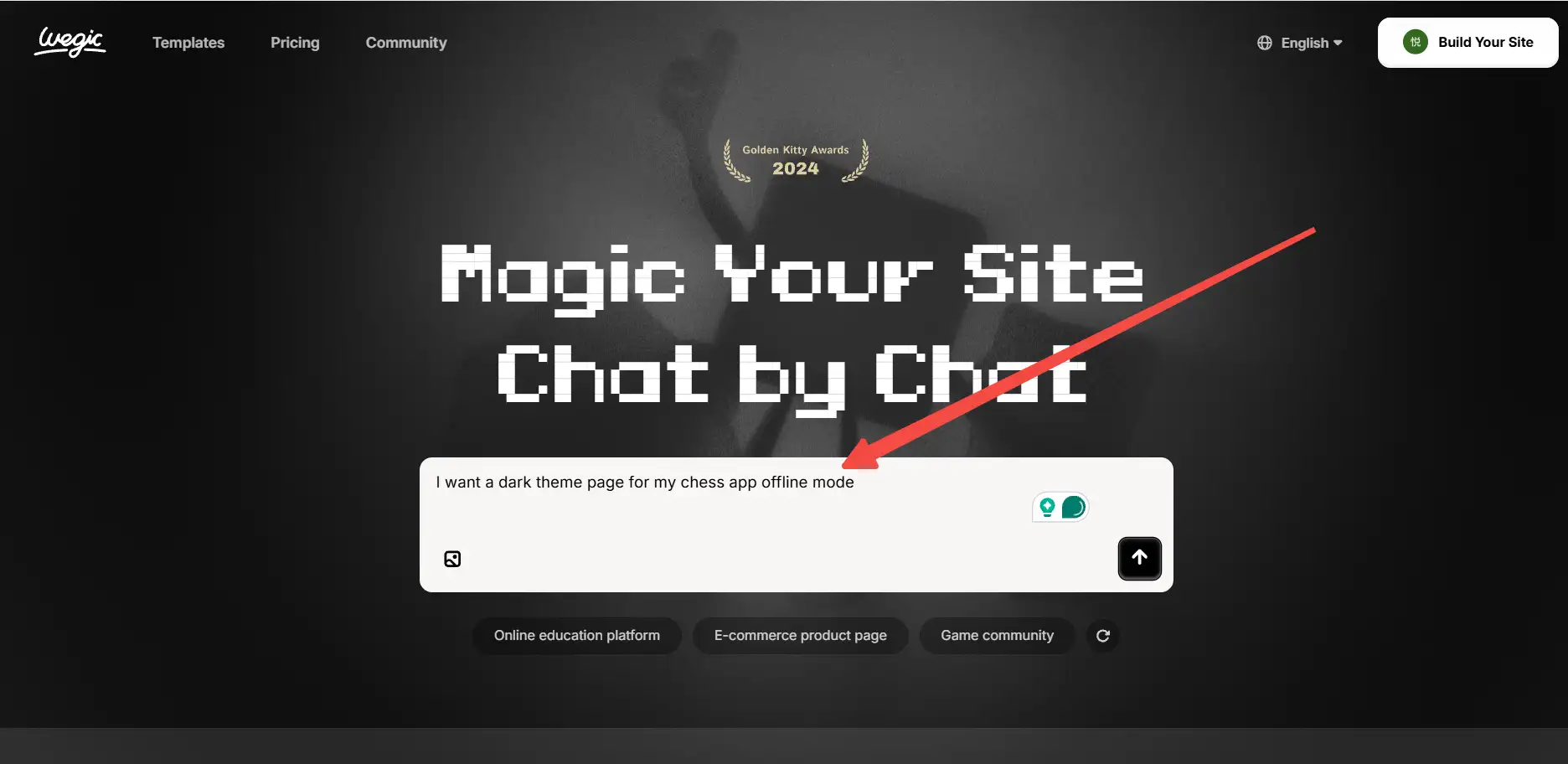
En minutos, obtienes una página de aterrizaje genial con un botón de descarga claro. Sin tarifa de diseño. Sin tarifa de desarrollador. Cuesta alrededor un 90% menos que subcontratar. Ahorras tiempo, ahorras dinero y te enfocas en construir un mejor juego.
#05 Lanza tu juego más rápido y aumenta las descargas

Como desarrollador independiente, tu principal trabajo es construir un gran juego. No deberías tener que pasar semanas construyendo un sitio web. Todo lo que realmente necesitas son tus capturas de pantalla de tu juego, una breve introducción y un enlace claro de descarga. Con un sitio web de una sola página, los jugadores pueden entender rápidamente qué hace tu juego y por qué es divertido.
Cuando los usuarios visitan tu página, pueden ver el juego real, funciones y beneficios en segundos. Pueden aprender que tu juego soporta la función de modo sin conexión de aplicación de ajedrez, así que pueden jugar en cualquier momento. Pueden ver cómo tu aplicación es diferente de las demás en la tienda de aplicaciones de ajedrez. Este mensaje claro y enfocado ayuda a la gente a sentirse segura y lista para descargar.
Un sitio web de una sola página mantiene todo simple. Sin confusión. Sin clics extra. Solo tu juego y un fuerte botón de descarga. ¿Listo para obtener más descargas de aplicaciones? Empieza ahora tu sitio web de juego de una sola página con el AI de Wegic.
Conclusión
En realidad, crear una gran aplicación de ajedrez es solo el comienzo. Los jugadores necesitan ver por qué tu juego es divertido y útil, o simplemente pasarán de largo. Un sitio web de una sola página te ayuda a mostrar el juego, las funciones y los beneficios reales en un solo lugar. Esto también es perfecto para una aplicación de ajedrez gratuita, donde los usuarios quieren entender lecciones, tácticas y cómo pueden mejorar antes de hacer clic en descargar. Mantén tu página limpia, rápida y fácil de seguir, y más visitantes se convertirán en descargas. Una página clara hace que tu juego brille y te ayuda a crecer más rápido.
Preguntas frecuentes
1. ¿Por qué necesito un sitio web separado para mi aplicación de ajedrez?
La página de la tienda de aplicaciones de ajedrez es limitada. No puedes mostrar videos largos, GIFs en movimiento o tutoriales detallados. Un sitio web de una sola página ayuda a los jugadores a ver claramente tu juego y aumenta las descargas.
2. ¿Puede un sitio web realmente aumentar las descargas de una aplicación de ajedrez gratuita?
Sí. Una página simple y clara ayuda a los usuarios a entender lecciones, acertijos y estrategias. Más comprensión significa más personas que hagan clic para descargar su aplicación para aprender ajedrez.
3. ¿Necesito habilidades de diseño para crear un sitio de una sola página?
No. Con herramientas como Wegic AI, solo subes capturas de pantalla y una breve descripción. La IA crea una página profesional para su aplicación de ajedrez rápidamente.
4. ¿Puede beneficiarse una aplicación de ajedrez gratuita o una aplicación de ajedrez con una versión sin conexión de un sitio web?
Absolutamente. Mostrar características como una aplicación de ajedrez sin conexión o lecciones gratuitas en una página de aterrizaje ayuda a los jugadores a ver el valor rápidamente y descargar su aplicación.
5. ¿Cuánto tiempo se tarda en crear un sitio web de un solo página para un juego?
Con Wegic AI, puedes crear una página profesional en minutos. Sin programación, sin experiencia en diseño, solo enfócate en tu aplicación gratuita para aprender ajedrez y deja que la IA se encargue de la página.
Escrito por
Kimmy
Publicado el
16 mar 2026
Compartir artículo
Leer más
Nuestro último blog
¡Páginas web en un minuto, impulsadas por Wegic!
Con Wegic, transforma tus necesidades en sitios web impresionantes y funcionales con AI avanzada
Prueba gratuita con Wegic, ¡construye tu sitio en un clic!