Step-by-Step Guide: How to Use AI for Everyday Tasks
Learn how to use AI to automate everyday tasks, boost productivity, and enhance your workflow. Discover tips to transform your efficiency with AI tools today!

Think of a helper who is always there, extremely brainy, and never tires. That’s what AI is becoming for many of us. Artificial intelligence is making everyday lives easier and faster—from your phone to online shopping, etc. And it’s more than a futuristic concept; it’s here now, and it’s transforming how we work and live.
Well, how to use AI properly in your day-to-day life? Whether it’s scheduling your calendar, writing down emails, or doing mundane, repetitive work, how to use AI tools is meant to get you more. And the best part? Anyone can learn tips to use AI tools to simplify life; no tech experience is required.
Wondering how to utilize AI to make money? AI can assist you in discovering novel prospects, automating chores, and enhancing productivity — all of which can contribute to increasing your income.
When it comes to how to use AI agents, You can definitely handle tasks, add reminders, and even respond to FAQs automatically using these agents, similar to virtual assistants. In this guide, we’ll show you step by step how to use AI properly to make your day work smoother, with greater organization and less stress. Want to get AI to do heavy lifting for you? Let’s get started!

How Can AI Remake Your Workday
AI has the potential to revolutionize the way you work, making your day smoother, faster, and less stressful. Here’s how to use AI tools to make them a benefit in various aspects.
Personal Assistant AI: Manage Meetings, Emails and Reminders

Instead, make it one that does your calendar, reminds you to do things, and maybe drafts emails for you. That’s precisely what personal assistant AI is capable of. It can take care of scheduling meetings and sending follow-up emails, as well as reminding you of upcoming deadlines.
It’s kind of like having your own digital secretary that’s on the clock 24/7, ensuring nothing falls through the cracks. This is an example of something nobody using these AI tools should need to emphasize again.
Manage Your Time with AI: Prioritize and Organize Your Work Day

With all that you have to do, it can be easy to feel overwhelmed. So, how to use AI agents to keep you on the right path? AI can help prioritize your tasks by identifying what’s most urgent or important. Other A.I. tools can also prevent distractions like social media during focus hours.
Visualize how artificial intelligence organizes your day with the sorted to-do list, reminders, and goal-keeping schedules. It comes down to less time spent planning and more time getting stuff done. AI is intuitive enough to help you maximize your time, ensuring your workday is as efficient and productive as possible.
AI for Information Gathering: Research, Report Writing, and Content Summarization

No more endless scrolling through pages of search results. For example, whether you need to research a topic or compile a report, AI agents can assist you in gathering information in seconds. Rather than going through hours of articles, AI tools can get you to the most relevant data in seconds, summarize it for you, and even provide a visualization for easier understanding.
Using AI for these tasks is straightforward and incredibly efficient, whether you can just look up a few facts for a project or dig deep into research for a presentation. And, how to use AI agents frees you up to spend more time synthesizing the information and making decisions.
How to Use AI Properly for Everyday Chores: General Guide
As we mentioned, automating tasks with AI is a game-changer in making your daily routine easier. Here’s how to get started, step by step, to make your day more productive.
Step 1: Identify Repetitive Tasks
Identifying repetitive tasks is the first step towards automating your daily tasks with AI. These are the kinds of tasks that require lots of time but don’t require your personal focus every single time. For example, stuff like writing email campaigns, doing meeting notes, or even organizing your to-do list. If you look at your daily routine, you’ll find tasks and tips to use AI tools that are best suited to you.
Consider how to use AI agents to manage your emails or place reminders. With the right tools, such easy tasks can be automated, freeing you to concentrate on what matters most. Once you’re armed with that list, you’re ready for step two.
Step 2: Pick the Right AI Tools

Once you’ve established what you can automate, the next step is to select the right AI tools for the task. Finding the right AI app for yourself can be difficult—there are tons of AI-powered apps out there, after all.
If you need help with scheduling and calendar management, you might use tools such as Google Assistant or Calendly, which can automatically set appointments based on your availability. For content creators, AI tools like Jasper or Copy. ai to write blog posts, a post on social media, and even emails. For data entry or common research, tools such as Zapier or Zapbot can automate the more annoying tasks of transferring information between apps or summarizing reports.
And when you’re thinking about how to use AI tools, keep in mind what will save you the most time and help your day flow. Don’t hesitate to experiment with a few different tools, testing them to see which works best for your particular tasks.
Step 3: Integrate AI Tools into Your Workflow

Now, just the fun bit: Bringing AI into your business. That means how to use AI properly and make AI tools up and running, and tune them so they naturally integrate into your day-to-day life. Begin by integrating the apps you use the most with your AI tools. So, if you’re using a toggle, like Zapier, you can link it to your email, calendar, or project management system for automation things like populating new tasks, reminders, or responding to common inquiries.
When you have your tools set, it’s time to customize them. You can also train your AI agent on how to do particular things, such as sending your people personalized emails or running automated workflows to collate projects. Using AI effectively is not just a matter of automation; it is a case of how to use AI agents to do what you need, without excessive complexity and effort.
Wegic AI for Creative Tasks: Streamlining Website Design
If you lack any design skills, designing a website can feel daunting. However, using AI, anybody can build a professional website in no time at all! One such example is Wegic, which is transforming the way people build websites by enabling design through simple chat prompts. This is how Wegic, an AI-powered website builder, is streamlining website creations:
How Wegic Makes Website Design Easy with AI
Use Wegic AI now for easy & intuitive website creation! Click the image below and get your ideal one now👇!
https://wegic.ai/
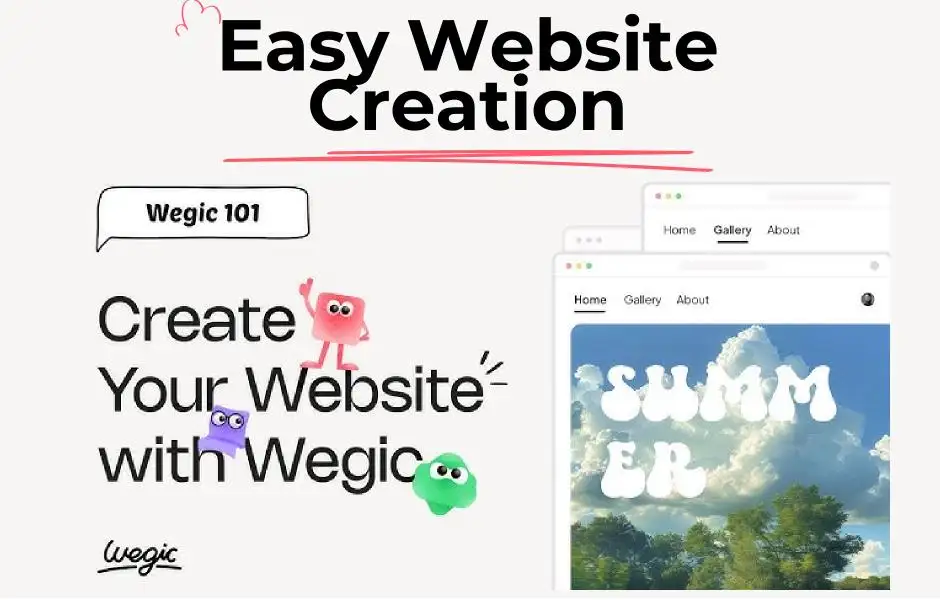
Conversational Design

-
Wegic is built on conversational AI principles, so you don’t need to know the first thing about coding or design principles to come up with your site.
-
Just have a conversation with the AI, tell it what you want your website to look like and let Wegic do the design part for you. It’s like having a conversation with a friend who also happens to be a design expert.”
-
How to use AI properly, in this case, means letting Wegic know what you like—style, layout, or specific features—and then watching as it transforms your ideas into a well-polished website.
Customization Made Easy
-
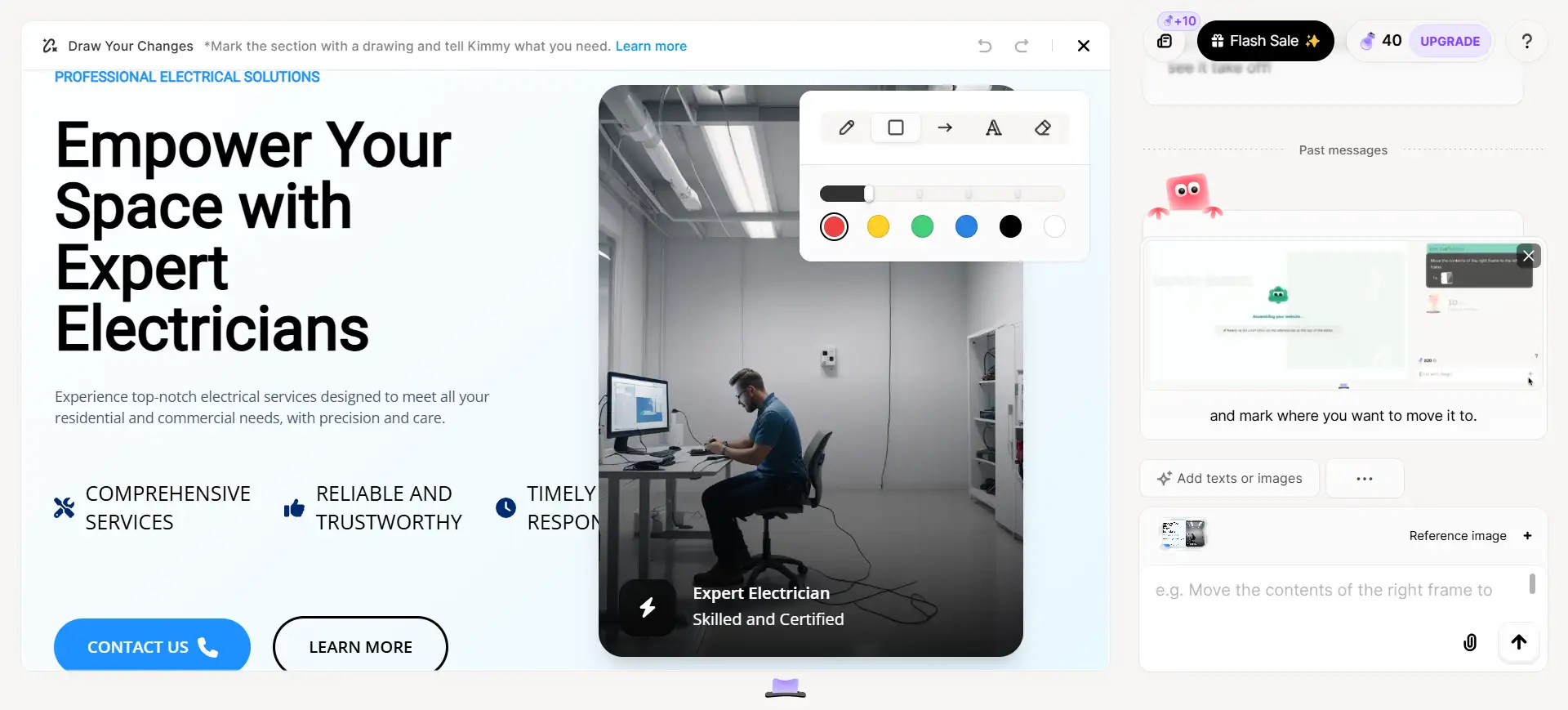
Once Wegic gets the basics down, it's time to give your website your signature. Looking to adjust the layout, colors, or fonts? Simply tell Wegic and it adapts the design for you immediately.
-
You could either upload images from your local or the web directly, as the web has royalty-free images. Want to tweak something? Wegic’s AI will give you different choices and assist in determining which looks good.
-
Customizing your site with AI tools is as easy as talking. Don’t have to go deep into fancy design software—Wegic does all the heavy lifting behind the scenes.
Animations and Other Advanced Features
-
Looking to enhance your website here? Wegic’s AI crafts beautiful animations, effects, hover text and images or scroll-driven animations.
-
Add interactive features on your site, such as the color of the text changes when hovering over it or some 3D transformations of the image. Using these features can help make your website more entertaining and retain visitors longer.
-
Using AI to add animations and special effects is easy to use. You simply tell Wegic’s AI the effect you’re looking for, and it does the rest.

-
A mobile-friendly website is an absolute necessity in the present date. Your website will automatically recognize what kind of device the users are using (phone, tablet, or computer) and adjust itself to look good regardless of what device it is being accessed from by Wegic.
-
Wegic makes sure that everything will look nice on the mobile phone display as you work your way through your design. That way you don’t need to bother adjusting symmetrical things for a smaller screen to quote.
-
Go ahead, let Wegic do the heavy lifting of the mobile optimization work for you, in this is yet another case of employing AI tools to save time and effort.
Feedback and Proposals in Real Time
-
One of Wegic's more unique and helpful features is that it provides immediate feedback. If you’re not sure how to design something, you can ask Wegic’s AI for guidance.
-
It will provide suggestions for best design practices, and assist in quality user experience as well. If there’s anything that doesn’t sit right, Wegic will suggest doing something about it, so your site always looks slick.
-
Instead, with Wegic’s AI, you have your own design assistant at the ready who can give notifications and help your site to improve. This is perfect if you are still wondering how to use ai agent or how to use ai properly.
User-Friendly Interface
-
You have no prior web design experience necessary to use Wegic. The interface remains intuitive and easy to navigate, which is ideal for beginners.
-
Wegic comes with a step-by-step approach, as a result, you won’t lose a single design aspect, and its visual options make customizing your site a snap.
-
This is how it’s done right with AI; it ought to be simple and intuitive and lead you through the process without inundating you.
Anyone Can Use Wegic (Even Without Design Skills)

No Coding Skills Required
-
You don’t have to learn HTML, CSS or JavaScript with Wegic. Instead, the AI does all the heavy lifting for you, allowing you to focus on what you want to create, rather than how you’re going to code it.
-
Wegic is a friendly, easy way to create a personal blog, create an online portfolio, or even a small business website. Whatever the purpose is, just try Wegic out and questions like "how to use ai agent" or "how to use ai properly" will be immediately resolved.
Save Time and Money
-
Hiring a designer or complex web development tools takes a lot of time and cost. Wegic solves both problems.
-
This is because, leveraging AI, you have a quick and cost-effective means to build a website that has a polished appearance and operates seamlessly. If you are running a small business or even working on personal projects this is a great way to save money and time using Wegic.
Common Challenges with AI and How to Overcome Them
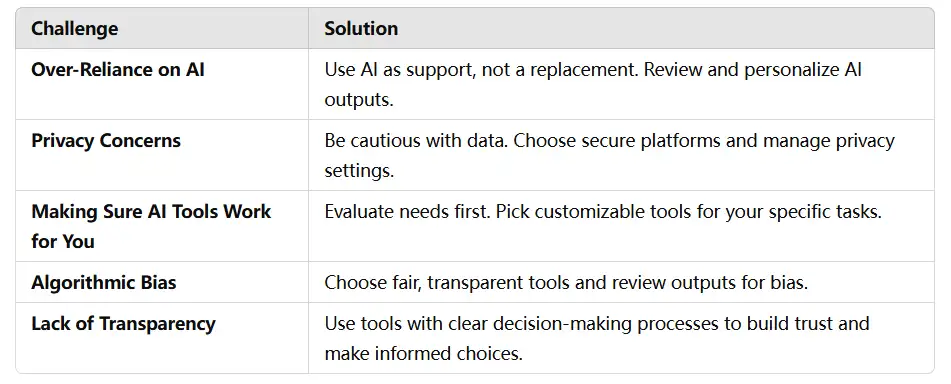
Over-Reliance on AI
Overreliance on AI may result in comfort, and critical thought and judgment skills may also deteriorate.
Solution:
-
Always use these tools as an assistive tool instead of a replacement Always question the outputs from AI and make sure that they are in accordance with your ambitions and ideologies. I.e., if using an AI agent to draft emails, use it to generate the content but review, edit and personalize it to your voice.
Privacy Concerns
Some AI systems rely on personal data, however, and they are being used in ways that are fueling concern over privacy and data security.
Solution:
-
Be cautious about what data you provide to AI tools. Choose platforms that value data security and provide clear information on how data is used. Audit privacy settings and permission to manage what information is available.
Making Sure AI Tools Work for You
Different AI tools are designed to solve different problems. The problem is, you might use the wrong tool, resulting in unwanted consequences.
Solution:
-
Evaluate your specific requirements before employing an AI tool. Also, seek solutions that allow customization and flexibility. For example, if you explore how to use AI tools for your content creation, look for platforms which enable you to adjust tone, style, and complexity to suit your audience.
Algorithmic Bias
AI systems may inadvertently propagate the biases inherent in their training data, resulting in unjust outcomes.
Solution:
-
Use AI tools designed with fairness and transparency. Back efforts to broaden the diversity of those who work on AI systems to limit bias. Continuously review AI-generated outputs for bias and precision, and assist in creating a better system.
Lack of Transparency
Some AI systems function as “black boxes,” meaning it can be difficult to understand their reasoning behind decisions.
Solution:
-
Look for AI tools that seem to present explainability functionalities that help visualize their thinking process. As a result, you can develop trust in AI and make informed choices about workflows that utilize AI recommendations.
Embrace the AI Revolution for a Smarter, More Efficient Life
AI will change the game for everyone — not just technologists. You can save time, increase productivity, and simplify daily tasks with the help of basic AI tools. Be it handling your emails or organizing your calendar, understanding how to leverage AI tools results in a seismic change in your day-to-day workflow, giving yourself more time to create.
Get started with some AI experimentation! You don’t need to be a specialist in that — you can take advantage of it. Even minor changes, such as automating tasks, can have a major impact. Selecting how to use AI correctly is simply testing out instruments, and seeing what works greatest for you. Use AI, and live better: smarter, and more efficient!
Written by
Kimmy
Published on
Mar 17, 2026
Share article
Read more
Our latest blog
Webpages in a minute, powered by Wegic!
With Wegic, transform your needs into stunning, functional websites with advanced AI
Free trial with Wegic, build your site in a click!
What kind of website do you want to build?